Why "Tagged PDF" Does Not Mean WCAG Compliant: PDF Accessibility Requirements Explained | AoD™
WEEK 2 | IT LEADERSHIP BLOG SERIES
Understanding PDF Accessibility, Compliance Risk, and Scalable Remediation
Tagged does not mean compliant, usable, or defensible
For many organizations, PDF accessibility compliance begins and ends with tagging. If a document is tagged, it's often assumed to be accessible, WCAG compliant, and safe to publish. This assumption represents one of the most common, and risky, misunderstandings in digital accessibility compliance.
A tagged PDF is not necessarily an accessible PDF, and at scale, that distinction carries significant consequences for ADA compliance and Section 508 requirements.
Why This PDF Accessibility Misconception Persists
What's missing: Outcome-based validation
PDF tagging has long been positioned as the primary accessibility requirement. Many PDF remediation tools and workflows treat tags as the finish line, creating a false sense of completion. From an IT perspective, this belief is understandable: tags are visible and measurable, most automated PDF accessibility checkers can confirm their presence, and "tagged PDF" sounds definitive.
However, WCAG 2.1 AA compliance is not about whether tags exist, it's about how a document actually functions for users of assistive technology, including screen readers and other accessibility tools.
What PDF Tags Actually Do
Important distinction: Structure alone does not equal accessibility
PDF tags provide structural information that helps assistive technologies interpret content. When applied correctly, PDF accessibility tags can identify headings and document hierarchy, paragraphs and lists, tables and basic reading order, as well as some semantic relationships.
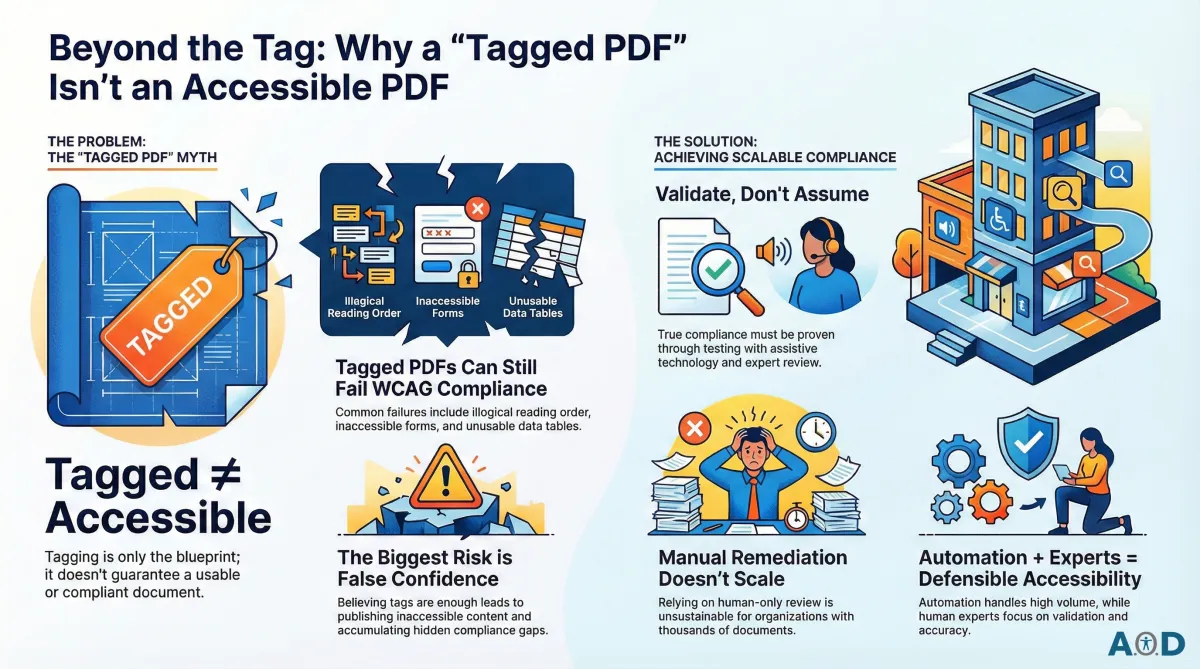
Tags are a required component of PDF accessibility standards, but they represent only one part of meeting WCAG 2.1 AA, ADA, and Section 508 accessibility requirements. Think of tagging as the document's blueprint, not the finished building.
What Tags Do Not Guarantee Under WCAG 2.1 AA
A tagged PDF can still fail users, and WCAG
A PDF can be fully tagged and still fail WCAG accessibility success criteria in meaningful ways.
Common failure points include:
Logical Reading Order - Tags may exist, but content can still be read in the wrong sequence - especially in multi-column layouts, complex tables, or visually designed documents.
Meaningful Semantics - Tags don't automatically ensure that headings are used correctly, lists are structured logically, or content relationships make sense to a screen reader user.
Forms Accessibility - Tagged PDFs frequently fail on missing or incorrect form field labels, improper tab order, and lack of instructions or error identification.
Tables and Data Relationships - Even when tables are tagged, header associations and navigation may be incorrect, making the data unusable for non-visual users.
Real-World Usability - Passing a basic checker does not mean a document is usable, navigable, or understandable by someone relying on assistive technology.
In short: tags can exist while users still cannot access the content.
Why Tagged PDFs Create Real Compliance Risk
Compliance reality: Regulators and users test usability, not tags
The greatest risk for organizations is not lack of effort, but false confidence. When teams rely on tagging alone, inaccessible PDFs continue to be published, WCAG compliance gaps remain hidden, PDF remediation becomes reactive, and legal and operational risk accumulates over time.
This risk intensifies in organizations with large PDF libraries, decentralized content creation, or third-party and vendor-provided PDFs. From a regulatory standpoint, ADA accessibility enforcement and Section 508 audits evaluate outcomes, not intent or assumptions.
Accessibility Requires Validation, Not Assumptions
Accessibility must be proven, not presumed
True PDF accessibility compliance must be validated through WCAG-aligned automated testing, assistive technology testing (including screen reader testing), and expert review of structure, navigation, and usability. A PDF may be tagged and even pass a basic accessibility checker, but that does not guarantee compliance with WCAG 2.1 Level AA, ADA Title II and Title III, or Section 508 standards.
PDF accessibility is not a checkbox, it is a measurable outcome.
Why Manual PDF Remediation Does Not Scale
Human-only remediation cannot keep pace with document volume
Manual PDF accessibility remediation and review can work for small document volumes, but at scale it quickly breaks down. Most organizations manage thousands or even millions of PDFs across multiple departments and systems, with new documents constantly being created.
Relying on manual accessibility remediation in this environment is not sustainable, which is why automation-first PDF accessibility remediation has become essential, not to replace certified accessibility experts, but to make their work scalable.
How Automated PDF Accessibility Solutions Bridge the Gap Between Tagged and Accessible PDFs
Strategic advantage: Automation handles scale; experts ensure accuracy
The automation-first PDF remediation platform, Accessibility on Demand™ (AoD™), allows organizations to:
Address PDF accessibility issues beyond basic tagging
Logical Reading Order: Ensuring content is read in the correct sequence, especially in multi-column layouts
Meaningful Semantics: Proper implementation of headings, lists, and tables so assistive technology can navigate the data
Interactive Elements: Ensuring form field labels are present and correctly associated [COMING SOON]
Visual Standards: Identifying color contrast and applying detailed alternative text for images
Apply consistent WCAG-compliant remediation across large document volumes
Validate accessibility using WCAG-aligned testing and PAC accessibility checks
Surface exceptions for expert review via audit-ready compliance reports
At Accessibility on Demand™ (AoD™), automation performs more than 90 percent, and in many cases 100 percent, of PDF remediation tasks, significantly reducing the need for expert reviewer involvement. Expert review is required only in limited circumstances, primarily where governance, validation, or risk management considerations apply.
AoD™ is purpose-built to support this model, enabling organizations to rely on automation for routine remediation while reserving expert oversight - whether through AoD’s Level 3 Expert Review service, an internal team, or a trusted third-party provider - for exception handling and compliance assurance. This approach is what makes PDF accessibility compliance both scalable and defensible.
Key Takeaways for IT and Compliance Leaders
Tagged PDFs are a starting point, not a guarantee of accessibility compliance
WCAG 2.1 AA compliance requires validation, not assumptions
Manual PDF remediation does not scale for enterprise document volumes
Automation-first PDF accessibility solutions enable consistent, defensible compliance, at scale
If your PDF accessibility strategy relies on tagging alone, it's time to reassess, not because teams have failed, but because accessibility requirements have evolved.
Tagged is a step. Accessible is the standard. Validated is the protection.
PDF accessibility is about outcomes. Every document should work for every user.
Next in the Series
We hope you are enjoying AoD’s 12-week "IT Accessibility Leadership" series. Look for next week’s blog about ADA, WCAG, and Section 508, "The Accessibility Triple Play: What PDF Accessibility Really Means for IT Leaders” navigating compliance, scale and risk.
About Accessibility on Demand™
Automation-first by design, not by compromise. Delivering compliance, speed, and cost-savings in one solution.
Accessibility on Demand™ (AoD™) is an enterprise-grade, automation-first, AI-powered PDF remediation platform with third-party PAC-verified compliance scores. Built to streamline document accessibility at scale, AoD™ aligns files to WCAG and PDF/UA standards and supports compliance with Section 508, ADA Title II and III, and AODA requirements through a repeatable, audit-ready remediation workflow.
AoD™ transforms inaccessible PDFs into structured, accessible files in minutes, helping organizations reduce reliance on manual remediation services while lowering total remediation costs. The platform is designed to deliver consistent, measurable, and defensible accessibility outcomes that can stand up to regulatory scrutiny and internal audit review.
Enterprise Capabilities
Seamless integration with existing workflows and IDP stacks.
High-volume batch processing for large files and document repositories.
Third-party validation with WCAG and PDF/UA compliance scoring.
Section 508- and ADA-aligned outputs with audit-ready reporting.
Dedicated account management and enterprise support.
Comprehensive onboarding and platform training.
For Remediation Professionals
AoD™ handles over 95% of the heavy lifting, including automated tagging, reading order, contextual alt-text metadata, and document structure. It delivers a complete tag tree so accessibility specialists can focus on subjective refinements and advanced remediation decisions, rather than repetitive manual work.
Beat the Deadlines: Talk with a PDF Accessibility Specialist
The bar for IT accessibility in the public sector is rising. If your organization is navigating ADA compliance, WCAG requirements, or Section 508 accessibility and struggling to understand what applies to your PDF documents. Discover how AoD™ can ensure your organization stays ahead of accessibility deadlines, clarify scope, risk, and next steps.
If you need help navigating ADA Title II regulations, please reach out to us to book a session: Enterprise Contact Form (opens in new tab)
To Sign-up for a free trial of AoD, visit: Book a Demo (opens in new tab)
Learn More About AoD:
To watch a 3-minute video about our AoD™ Solution, visit our Homepage: Accessibility On Demand (opens in new tab)
AoD’s "IT Leadership Blog" Series:
Accessibility Insights (external link)
Week 1 - “Why PDF Accessibility Lands on IT's Desk"
Week 2 - “Why ‘Tagged PDF’ Does Not Mean WCAG Compliant: PDF Accessibility Requirements Explained"
Week 3 - “The Accessibility Triple Play: What PDF Accessibility Really Means for IT Leaders"
Week 4 - “Enterprise PDF Accessibility at Scale: A Governance Framework for CIOs"
Week 5 - "Manual vs. Automated PDF Accessibility Remediation: Automation Is the Only Model That Scales"
Week 6 - "Decentralized PDFs: A Centralized Accessibility Crisis"
Week 7 - "Third-Party PDFs and Accessibility Compliance: Who Owns the Risk?"
Week 8 - "When Forms Fail, Compliance Follows: The CIO's Hidden Accessibility Liability"
Week 9 - "Designing for Outcomes, Not Scores: The Future of PDF Accessibility Leadership"
Week 10 - “Stop Remediating PDFs. Build a Sustainable PDF Accessibility Program Instead."
Week 11 - "IT Is Not the Digital Accessibility Compliance Bottleneck. The DOJ Extension Gives CIOs Time to Prove It."
Week 12 - "Source Remediation vs. The HTML-Transcript Approach. Seven Dimensions That Determine Legal Exposure"
External Links to Other Great AoD Blogs You Don't Want o Miss:
Blog: "The 2.5 Trillion PDF Problem" (opens in new tab)
Blog: "Breaking the PDF Barrier: How Your Agency Can Beat ADA Compliance Costs" (opens in new tab)
Blog: "Understanding ADA Title II Exceptions" (opens in new tab)
External Links to Additional Resources:
W3C: Web Content Accessibility Guidelines (WCAG) 2.1 (opens in new tab)
Section 508 Standards: https://www.section508.gov/ (opens in new tab)
ADA: Exceptions (opens in new tab)
First Steps Toward Compliance:https://www.ada.gov/resources/web-rule-first-steps/ (opens in new tab)
DOJ Title II Web Accessibility Final Rule: https://www.ada.gov/resources/2024-03-08-web-rule/ (opens in new tab)
