When Forms Fail, Compliance Follows | AoD™
WEEK 8 | IT LEADERSHIP BLOG SERIES
The CIO's Hidden Accessibility Liability
Accessibility On Demand™ (AoD™) is tackling a problem that has stumped the accessibility industry for decades: the automated, at-scale remediation of inaccessible PDF forms. Despite years of regulatory pressure, tooling advances, and organizational investment, no vendor has fully solved the end-to-end problem of identifying, repairing, and validating form accessibility across the enterprise.
AoD™ is poised to transform the forms landscape by applying intelligent automation to overcome challenges that manual processes and conventional automation solutions have been unable to address.
PDF forms are not just another accessibility consideration. They are the single fastest path from user frustration to legal escalation. For CIOs, understanding why forms fail and how to fix them at scale is now a core compliance competency, not a side project.
Forms: Where Accessibility Becomes Real and Legal Risk Becomes Acute
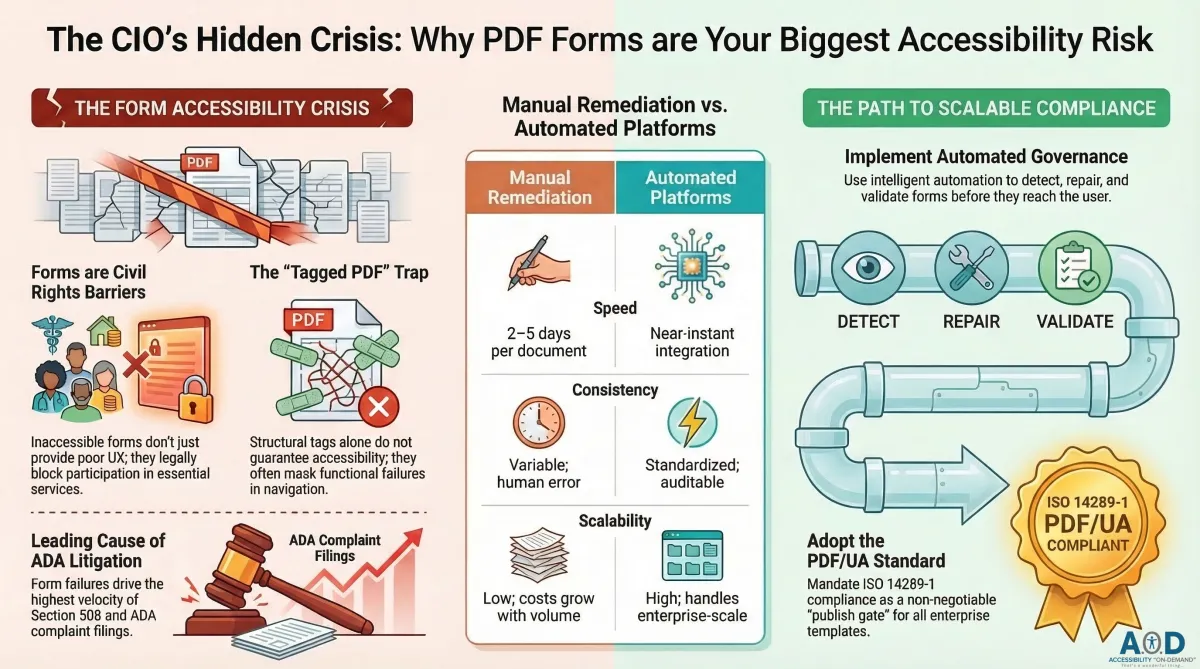
Unlike static documents, forms are transactional. Users cannot simply skip them or find an alternative path. When a benefits application, payroll authorization, enrollment form, or service request is inaccessible, users are not merely inconvenienced; they are completely blocked from participation. In the eyes of the law, that is not poor UX. It is a civil rights violation.
The stakes are compounded by the types of forms typically affected: government benefits, healthcare enrollment, financial authorizations, educational registrations. These are not discretionary interactions. They represent essential services, and inaccessibility transforms a design oversight into an institutional barrier.
Every blocked form submission carries downstream consequences:
A formal ADA or Section 508 complaint that triggers regulatory scrutiny
Litigation under the Rehabilitation Act or state-level accessibility statutes
Reputational damage that erodes public and user trust
A regulatory audit that exposes wider organizational accessibility failures
Legal settlements that dwarf the cost of proactive remediation
CIOs who treat form accessibility as a UX edge case are operating with dangerously incomplete risk models. This is enterprise liability: measurable, escalating, and avoidable.
Action Step: Inventory every publicly available PDF form across your digital ecosystem. Rank them by user criticality. Benefits, finance, HR, and service-access forms represent the highest legal exposure and should lead all remediation efforts.
Why Most PDF Forms Still Fail the Accessibility Test
The pervasiveness of inaccessible PDF forms is not a mystery. It is a predictable consequence of how forms are built. Forms are routinely exported from Word, InDesign, Adobe Acrobat, or line-of-business software with no accessibility review, no structured tagging verification, and no testing with assistive technology. The result is a document that appears functional on screen but is systematically broken for any user relying on a screen reader, keyboard navigation, or voice input.
The most common structural failures include:
Unnamed form fields: Fields without programmatic labels leave screen readers with nothing to announce. The user encounters silence where they need instruction.
Disordered tab sequences: When the logical reading order and the keyboard tab order diverge, keyboard-only users become trapped or disoriented within the form.
Non-programmatic error notices: Validation errors communicated only through visual color changes or floating tooltips never reach users of assistive technology.
Decorative instruction text: Critical instructions rendered as images or positioned outside the field's label association are invisible to screen readers.
Missing role definitions: Fields without appropriate ARIA roles or PDF form field types are indistinguishable to assistive technology. A text input, a checkbox, and a dropdown all appear identical.
Absent required-field indicators: Screen reader users have no way to identify mandatory fields if the asterisk or label is purely visual with no programmatic equivalent.
These are not edge-case failures. They are the norm. Organizations that have not actively audited their form library should assume widespread non-compliance, because the default output of most document creation workflows is an inaccessible PDF.
Action Step: Mandate PDF/UA (ISO 14289-1) compliance for all enterprise form templates before publication. PDF/UA is the recognized international standard for accessible PDF structure, and compliance verification should be a publish gate, not an afterthought.
The "Tagged PDF" Trap: When Compliance Stops at the Checkbox
A pervasive misconception in enterprise accessibility programs is that a "tagged PDF" equals an accessible PDF. It does not. Tagging creates structural scaffolding, but structural scaffolding without correctly associated content is an empty framework. A fully tagged PDF can still fail every critical WCAG 2.1 form accessibility criterion.
Automated tagging tools, including those built into Adobe Acrobat, Microsoft Word export, and third-party converters, produce tags that pass surface-level inspection while delivering dysfunctional experiences to real users. Auditors refer to this as false compliance: the appearance of accessibility structure without the functional reality of accessible interaction.
The gap between tagged and accessible is most visible in four areas:
Field labeling: A tag may exist for a form field, but if the label text is not programmatically associated with that specific field, screen readers cannot make the connection.
Tab order integrity: Tags do not govern tab sequence. A document can be fully tagged and still route keyboard users through fields in random or illogical order.
Error identification: WCAG 3.3.1 requires that input errors be identified in text and described to the user. Tagged PDFs routinely fail this criterion entirely.
Instructions and hints: Contextual instructions must be both visible and programmatically associated with their relevant fields. Tagging alone does not enforce this relationship.
CIOs relying on tagging reports as evidence of accessibility compliance are accepting risk they may not fully understand. A document that appears compliant in an automated scan can still generate an ADA complaint on first use by a screen reader user.
Action Step: Implement automated form accessibility validation that tests beyond tag presence. Verify label association, tab sequence logic, error hint exposure, and role accuracy before any form is published or distributed.
The Anatomy of an ADA Complaint: Why Forms Dominate Enforcement
Inaccessible static PDFs frustrate users. Inaccessible forms block them from completing required actions. That distinction, between inconvenience and obstruction, is precisely why PDF forms dominate ADA and Section 508 complaint filings and drive the highest enforcement velocity in digital accessibility compliance.
When a user cannot complete a required form, there is no workaround. They cannot skim to the relevant section, use a different browser, or ask a colleague to summarize the content. The form must be completed, and if the form is inaccessible, the user is excluded from whatever that form gates: a benefit, a service, an enrollment, an authorization.
The legal mechanics of this escalation are well-documented. Under the ADA, Section 508, and the Rehabilitation Act, digital barriers to essential services constitute discrimination. Courts and enforcement agencies have consistently found that the obligation to provide accessible forms is non-discretionary, regardless of the organization's size, resources, or awareness of the barrier.
The enforcement pattern is predictable: a user encounters a form they cannot complete, files a complaint with the relevant agency or initiates litigation, and the organization faces an investigation that almost invariably reveals that the form failure is not isolated but systemic. One complaint triggers a review of the entire document and form ecosystem. Organizations that have relied on informal accessibility practices rarely survive that review without significant remediation commitments and, increasingly, financial penalties.
Action Step: Implement automated form accessibility validation that tests beyond tag presence. Verify label association, tab sequence logic, error hint exposure, and role accuracy before any form is published or distributed.
Manual Remediation: A Technically Unsustainable Compliance Model
The conventional response to accessible form failures is manual remediation: a specialist reviews each form, corrects tag structures, associates labels, establishes tab order, and validates the output. For a single high-priority form, this process is workable. At enterprise scale, it is a compliance liability in itself.
Manual remediation creates three compounding problems that CIOs need to quantify explicitly:
Time-to-publish delays: Remediation cycles for complex forms routinely run two to five business days per document when specialist queues are involved. For organizations with high-frequency form publication cycles, this creates bottlenecks that either slow operations or bypass accessibility review entirely.
Inconsistency across remediators: Manual processes produce variable outcomes. Two specialists reviewing the same form will make different tagging decisions, produce different tab orders, and resolve ambiguous instructions differently, creating inconsistent accessibility outcomes that cannot be audited systematically.
Compounding compliance debt: Every new version of a form requires a new remediation pass. Organizations that publish forms frequently, or that maintain large legacy form libraries, accumulate compliance debt faster than manual teams can address it.
The economic case for manual remediation collapses at scale. Organizations with hundreds or thousands of active forms, publishing new versions continuously, cannot achieve sustainable compliance through human intervention alone. The cost per remediation, multiplied by form volume and publication frequency, quickly exceeds the investment required to implement automated solutions. And manual processes never achieve the consistency or auditability that automated systems provide.
Action Step: Calculate the true cost of your current remediation model: specialist hours per form multiplied by form volume and average publication frequency. Compare that figure against the cost of automation. The business case is typically decisive.
Automation as a Governed Compliance Control, Not a Quick Fix
Modern accessibility automation platforms represent a fundamental shift in how form compliance is operationalized. Rather than identifying problems after publication and remediating reactively, these platforms integrate into document workflows to detect, repair, and validate accessibility issues before a form reaches any user.
The technical capabilities of mature automation platforms address the full spectrum of form accessibility failures:
Structural analysis and tag correction: Automated systems can parse the full tag tree, identify missing or malformed tags, and reconstruct compliant structure based on content analysis.
Label association and field role assignment: Platforms can detect unlabeled fields and apply programmatic label associations using proximity analysis, visual alignment heuristics, and semantic content recognition.
Tab order harmonization: Automated tools can analyze the visual layout of a form and re-sequence the tab order to match the logical reading order. This is a technically complex operation that manual remediators routinely execute inconsistently.
Error identification infrastructure: Platforms can insert programmatic error announcement structures into form fields, ensuring that WCAG 3.3 error criteria are satisfied at the structural level.
Validation and reporting: Every automated remediation pass produces an auditable record of what was detected, what was corrected, and what requires human review. This creates the documentation trail that compliance programs and legal defense require.
Critically, automation does not eliminate human judgment. It focuses it. By handling high-volume, repeatable structural corrections automatically, these platforms free accessibility specialists to address the genuinely complex cases: forms with ambiguous instruction text, multi-step workflows with conditional field logic, or forms that require substantive content restructuring. The result is a compliance program that is simultaneously more comprehensive and more efficiently resourced than any manual model can achieve.
This transforms form accessibility from a reactive compliance drain into a governed, auditable control point: owned by IT, enforced by automation, validated by data, and defensible under regulatory scrutiny.
Action Step: Integrate automated accessibility checks into every document publishing workflow, particularly where departments self-publish user-facing PDFs without centralized review. The highest-risk forms are often the ones IT never sees before they go live.
The CIO Mandate: Fix Forms First, Build Compliance Programs That Scale
CIOs asked to prioritize accessibility investments consistently face the same strategic question: where does meaningful compliance begin? The answer, consistently validated by complaint data, legal precedent, and user research, is forms.
Forms are the intersection point of three forces that define accessibility compliance exposure: legal obligation, user criticality, and organizational volume. No other document type concentrates these forces as acutely. A static document that is inaccessible is a barrier to information. An inaccessible form is a barrier to participation, and the law treats that distinction with corresponding seriousness.
The CIO's mandate in this area extends beyond technical remediation. It requires establishing governance structures that make accessible form publication the default, not the exception:
Policy frameworks that define PDF/UA compliance as a non-negotiable publish requirement
Automated validation integrated into every content management and document workflow system
Metrics and monitoring that track form accessibility performance as an operational indicator, not just a compliance checkbox
Vendor accountability requirements that extend accessibility obligations to third-party form suppliers and software vendors
Training programs that shift accessibility ownership from a specialist function to an organizational competency
Accessible forms are not only a compliance achievement. They are a functional improvement for every user. Clear labels, logical navigation, and structured error feedback improve form completion rates across the board. The accommodations that make forms accessible for users with disabilities make them demonstrably easier for everyone.
When forms work for everyone, compliance follows naturally. And when compliance follows naturally, the CIO's role shifts from crisis management to strategic leadership in digital inclusion.
Next in the Series
Look for Week 9 in our 12-part IT Leadership Blog series: "Designing for Outcomes, Not Scores: The Future of PDF Accessibility Leadership".
About Accessibility on Demand™
Automation-first by design, not by compromise.
Accessibility on Demand™ (AoD™) is an enterprise-grade, automation-first PDF accessibility remediation platform. AoD™ aligns documents to WCAG and PDF/UA standards and supports compliance with Section 508, ADA Title II and III, and AODA requirements through a scalable, repeatable remediation framework.
The platform converts inaccessible PDFs into structured, audit-ready files in minutes, reducing dependency on manual services and significantly lowering total remediation costs. AoD™ provides organizations with measurable, consistent, and defensible accessibility outcomes suitable for regulatory scrutiny and internal audit review.
AoD™ Enterprise Capabilities:
Seamless integration with existing workflows and IDP stacks
High-volume batch processing for large files and document repositories
Third-party validation with WCAG and PDF/UA compliance scoring
Section 508 and ADA-aligned outputs with audit-ready reporting
Dedicated account management and enterprise support
Comprehensive onboarding and platform training
For Remediation Professionals:
AoD™ handles over 95% of the heavy lifting (automated tagging, reading order, contextual alt-text metadata, and structure) and delivers a complete tag tree, so accessibility specialists can still make subjective refinements and advanced remediation decisions where needed, rather than spending time on repetitive manual work.
Beat the Deadlines: Talk with a PDF Accessibility Specialist
The bar for IT accessibility in the public sector is rising. If your organization is navigating ADA compliance, WCAG requirements, or Section 508 accessibility and struggling to understand what applies to your PDF documents. Discover how AoD™ can ensure your organization stays ahead of accessibility deadlines, clarify scope, risk, and next steps.
External Links to Learn More About AoD:
To watch a 3-minute video about our AoD™ Solution, visit our Homepage: Accessibility On Demand (opens in new tab)
If you need help navigating ADA Title II regulations, please reach out to us to book a session:
Enterprise Contact Form (opens in new tab)
To Sign-up for a free trial of AoD, visit: Book a Demo (opens in new tab)
External Link to AoD’s "IT Leadership Blog" Series: Accessibility Insights
Week 1 - “Why PDF Accessibility Lands on IT's Desk"
Week 2 - “Why ‘Tagged PDF’ Does Not Mean WCAG Compliant: PDF Accessibility Requirements Explained"
Week 3 - “The Accessibility Triple Play: What PDF Accessibility Really Means for IT Leaders"
Week 4 - “Enterprise PDF Accessibility at Scale: A Governance Framework for CIOs"
Week 5 - "Manual vs. Automated PDF Accessibility Remediation: Automation Is the Only Model That Scales"
Week 6 - "Decentralized PDFs: A Centralized Accessibility Crisis"
Week 7 - "Third-Party PDFs and Accessibility Compliance: Who Owns the Risk?"
Week 8 - "When Forms Fail, Compliance Follows: The CIO's Hidden Accessibility Liability"
Week 9 - "Designing for Outcomes, Not Scores"
Week 10 - “Stop Remediating PDFs. Build a Sustainable PDF Accessibility Program Instead."
External Links to Other Great AoD Blogs You Don't Want to Miss:
Blog: "The 2.5 Trillion PDF Problem" (opens in new tab)
Blog: "Breaking the PDF Barrier: How Your Agency Can Beat ADA Compliance Costs" (opens in new tab)
Blog: "Understanding ADA Title II Exceptions" (opens in new tab)
External Links to Additional Resources:
W3C: Web Content Accessibility Guidelines (WCAG) 2.1 (opens in new tab)
Section 508 Standards: https://www.section508.gov/ (opens in new tab)
ADA: Exceptions (opens in new tab)
First Steps Toward Compliance: https://www.ada.gov/resources/web-rule-first-steps/ (opens in new tab)
DOJ Title II Web Accessibility Final Rule: https://www.ada.gov/resources/2024-03-08-web-rule/ (opens in new tab)
