Designing for Outcomes, Not Scores: The Future of PDF Accessibility Leadership | AoD™
WEEK 9 | IT LEADERSHIP SERIES
For CIOs in government, education, healthcare, and enterprise, PDF accessibility is no longer a checkbox exercise. It’s an operational and legal requirement, and more importantly, it’s a service quality issue. The real question isn’t “Did we pass the test?” It’s “Can the people who need this document actually use it?”
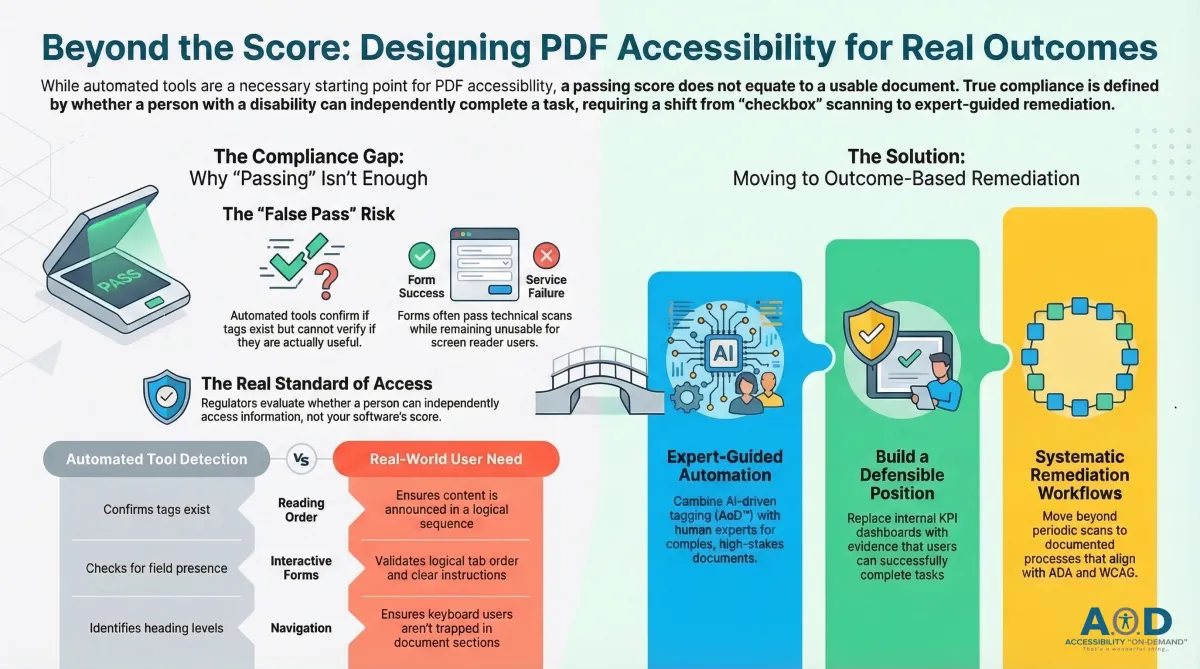
Automated PDF accessibility testing tools are the obvious first move when you’re managing a large document inventory. They give teams fast visibility into missing tags, contrast failures, and untagged elements. That’s useful. But a passing score is not the same as an accessible document and treating them as equivalent is where programs start to break down.
Scores Don’t Define Access. Users Do.
ADA Title II and III, Section 508, and WCAG 2.1 all evaluate accessibility through one lens: can a person with a disability independently access services, information, and digital processes? That’s the standard in complaints, investigations, and audits. Regulators don’t ask what the automated tool found. They look at whether the affected user could do what they came to do.
Automated tools are good at catching structural problems: missing language declarations, unlabeled images, and contrast issues that exceed a threshold. They can’t tell you whether reading order makes any sense, whether form instructions mean anything to someone who can’t see the layout, or whether a keyboard user gets stranded halfway through a document.
That gap between what tools measure and what users experience is where the real compliance risk lives.
Why PDFs “Pass” and Still Fail Users
Here’s what automated tools regularly miss:
Reading order that looks fine visually but is announced completely out of sequence by a screen reader.
Form labels that technically exist but don’t tell the user what’s being asked.
Keyboard navigation that skips sections or traps focus.
Headings, lists, and tables that are tagged but structured in ways that fall apart when read linearly.
Error messages that never reach assistive technology, so users have no idea what went wrong.
Tools can confirm a tag is there. They can’t confirm if the tag does anything useful. For CIOs relying on dashboards to certify compliance, that distinction matters. A document that scores well but blocks a screen reader user from completing a task isn’t compliant, it just looks compliant.
Forms Are Where This Gets Real
If you want to see automated testing hit its limits quickly, look at interactive PDF forms. Forms aren’t passive content. They’re how citizens file applications, patients register for care, students request accommodations, employees complete onboarding. When a form is inaccessible, that’s a service failure.
Automated tools can confirm that fields are present and tagged. They can’t reliably tell you whether tab order follows a logical sequence, whether dynamic instructions and required-field indicators reach assistive technology, or whether a user can complete the form without hitting a dead end.
As we discussed in last week’s blog, this is why PDF forms show up so often in enforcement actions and complaints. A form with a passing score and a failing user experience is still a compliance liability. Testing dashboards can’t catch that. Something has to validate real-world usability, particularly for documents where the stakes are high.
What CIOs Actually Need
Running tests isn’t the job, it’s the start. Organizations facing audits, investigations, or legal review need to show that accessibility is systematic and consistent, not just run periodically when someone asks.
That means documented remediation workflows, not just findings reports. It means validation that forms and complex documents work with assistive technologies. It means reporting that holds up in front of auditors, legal counsel, and executive leadership, not just internal KPIs. The shift is from “we ran the scan” to “here’s evidence users can succeed.”
That requires setting expectations across teams, not just running tools when a deadline approaches.
Where Accessibility on Demand™ Fits
AoD™ was built to close the gap between detection and proof. It combines OCR, document capture, and AI-driven tagging to remediate PDFs at scale; correcting reading order, headings, lists, tables, and form structure, not just flagging them. It generates PAC-validated compliance scores aligned with WCAG, ADA, and Section 508, and produces documentation designed to hold up in audits and legal review.
The underlying logic is straightforward: a compliant PDF is one a screen reader user can read, navigate, and complete a task with. Not one that scored well on a report.
Automation Has to Be Expert-Guided
Automation handles the volume problem well, remediating common issues across large document inventories, applying consistent tagging rules, validating against standardized rulesets. That’s where it belongs.
Certified accessibility experts fill in what automation can’t: complex documents with unusual structure, high-stakes forms that need end-to-end usability review, governance that enforces consistency across departments and vendors. Neither automation alone nor manual review alone gets you there at scale. Both together do.
For CIOs, this isn’t a philosophy, it’s a practical answer to the question of how you make accessibility feasible across thousands of documents without losing confidence in the results.
The Bottom Line
Automated PDF testing is a necessary starting point. It’s not a finish line. Organizations that treat passing scores as proof of compliance are accumulating invisible risk: documents that look clean but fail the people who depend on them.
The leaders who close that gap through remediation workflows, expert validation, and outcome-oriented metrics, will be in a defensible position when audits come. They’ll also be delivering what accessibility law requires: content that works for real users.
Next in the Series
Look for Week 10 in our 12-part IT Leadership Blog series: “Stop Remediating PDFs. Build a Sustainable PDF Accessibility Program Instead."
About Accessibility on Demand™
Automation-first by design, not by compromise. Delivering compliance, speed, and cost-savings in one solution.
Accessibility on Demand™ (AoD™) is an enterprise-grade, automation-first, AI-powered PDF remediation platform with third-party PAC-verified compliance scores. Built to streamline document accessibility at scale, AoD™ aligns files to WCAG and PDF/UA standards and supports compliance with Section 508, ADA Title II and III, and AODA requirements through a repeatable, audit-ready remediation workflow.
AoD™ transforms inaccessible PDFs into structured, accessible files in minutes, helping organizations reduce reliance on manual remediation services while lowering total remediation costs. The platform is designed to deliver consistent, measurable, and defensible accessibility outcomes that can stand up to regulatory scrutiny and internal audit review.
Enterprise Capabilities
Seamless integration with existing workflows and IDP stacks.
High-volume batch processing for large files and document repositories.
Third-party validation with WCAG and PDF/UA compliance scoring.
Section 508- and ADA-aligned outputs with audit-ready reporting.
Dedicated account management and enterprise support.
Comprehensive onboarding and platform training.
For Remediation Professionals
AoD™ handles over 95% of the heavy lifting, including automated tagging, reading order, contextual alt-text metadata, and document structure. It delivers a complete tag tree so accessibility specialists can focus on subjective refinements and advanced remediation decisions, rather than repetitive manual work.
Beat the Deadlines: Talk with a PDF Accessibility Specialist
The bar for IT accessibility in the public sector is rising. If your organization is navigating ADA compliance, WCAG requirements, or Section 508 accessibility and struggling to understand what applies to your PDF documents. Discover how AoD™ can ensure your organization stays ahead of accessibility deadlines, clarify scope, risk, and next steps.
If you need help navigating ADA Title II regulations, please reach out to us to book a session: Enterprise Contact Form (opens in new tab)
To Sign-up for a free trial of AoD, visit: Book a Demo (opens in new tab)
Learn More About AoD:
To watch a 3-minute video about our AoD™ Solution, visit our Homepage: Accessibility On Demand (opens in new tab)
AoD’s "IT Leadership Blog" Series:
Accessibility Insights (external link)
Week 1 - “Why PDF Accessibility Lands on IT's Desk"
Week 2 - “Why ‘Tagged PDF’ Does Not Mean WCAG Compliant: PDF Accessibility Requirements Explained"
Week 3 - “The Accessibility Triple Play: What PDF Accessibility Really Means for IT Leaders"
Week 4 - “Enterprise PDF Accessibility at Scale: A Governance Framework for CIOs"
Week 5 - "Manual vs. Automated PDF Accessibility Remediation: Automation Is the Only Model That Scales"
Week 6 - "Decentralized PDFs: A Centralized Accessibility Crisis"
Week 7 - "Third-Party PDFs and Accessibility Compliance: Who Owns the Risk?"
Week 8 - "When Forms Fail, Compliance Follows: The CIO's Hidden Accessibility Liability"
Week 9 - "Designing for Outcomes, Not Scores"
Week 10 - “Stop Remediating PDFs. Build a Sustainable PDF Accessibility Program Instead."
Week 11 - "IT Is Not the Digital Accessibility Compliance Bottleneck. The DOJ Extension Gives CIOs Time to Prove It."
Week 12 - "Source Remediation vs. The HTML-Transcript Approach. Seven Dimensions That Determine Legal Exposure."
External Links to Other Great AoD Blogs You Don't Want to Miss:
Blog: "The 2.5 Trillion PDF Problem" (opens in new tab)
Blog: "Breaking the PDF Barrier: How Your Agency Can Beat ADA Compliance Costs" (opens in new tab)
Blog: "Understanding ADA Title II Exceptions" (opens in new tab)
External Links to Additional Resources:
W3C: Web Content Accessibility Guidelines (WCAG) 2.1 (opens in new tab)
Section 508 Standards: https://www.section508.gov/ (opens in new tab)
ADA: Exceptions (opens in new tab)
First Steps Toward Compliance: https://www.ada.gov/resources/web-rule-first-steps/ (opens in new tab)
DOJ Title II Web Accessibility Final Rule: https://www.ada.gov/resources/2024-03-08-web-rule/ (opens in new tab)
