PDF Reading Order, Tag Structure, and Accessibility Compliance: Getting It Right
By Accessibility on Demand | A Netra Labs Publication | Technical Implementation Series | Article 2
A document can pass an automated compliance checker and fail every screen reader user who opens it. The reason is almost always reading order.
The CIO who builds a durable accessibility program is rarely the one who announced the boldest strategy. More often it is the one who looked honestly at what the organization could execute, found the pressure points before they became incidents, and chose infrastructure that matched institutional capacity rather than aspirational headcount. PDF remediation is exactly that kind of decision. It sits at the intersection of legal exposure, operational scale, and technology capability. The gap between a program that holds and one that produces complaints, OCR notices, and audit findings usually comes down to whether the underlying platform was chosen for what it could truly do.
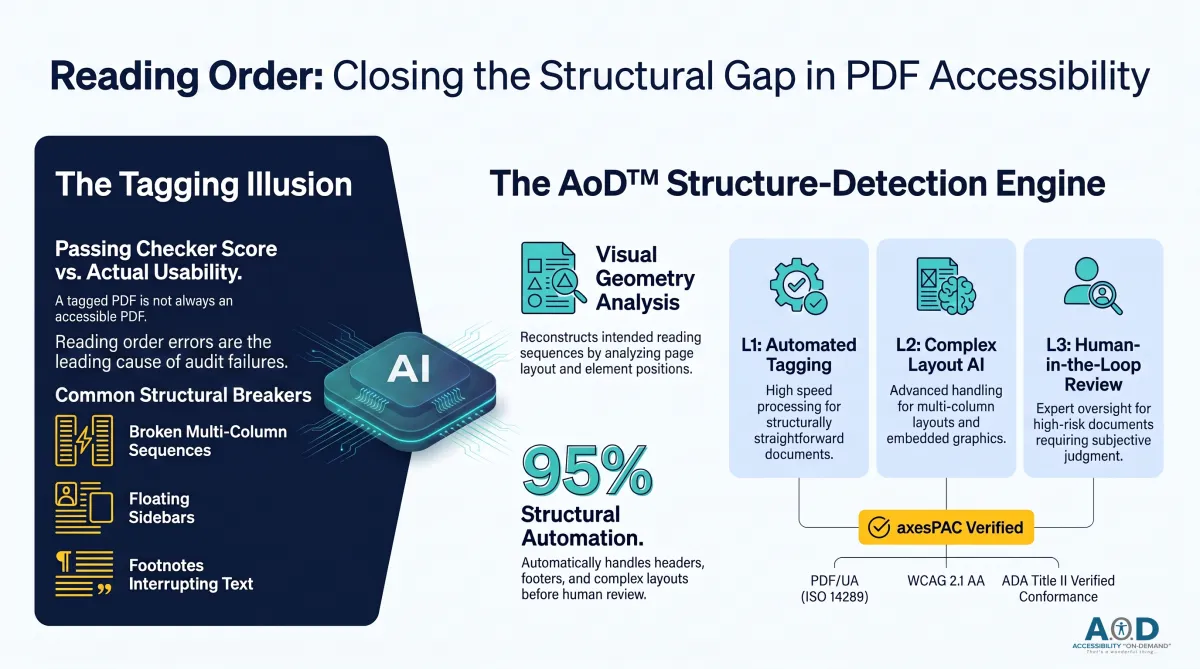
For that leader, the compliance picture around PDF accessibility has a specific flaw worth understanding. The most persistent misconception in PDF accessibility work is that tagging and accessibility mean the same thing. They do not. A PDF can be fully tagged and completely unusable. The tags may exist. The reading order may still be wrong. To a sighted user, the document looks fine. To a screen reader, content arrives in the sequence the PDF’s internal tag tree presents it, which may have no relationship to the visual sequence a human eye would follow.
Reading order errors are among the most frequently cited findings in PDF accessibility audits. They are also a leading reason organizations pass automated compliance checks and still receive complaints, escalations, and legal notices from users with disabilities. The automated checker confirms that tags exist. It does not confirm the tags reflect the right sequence, the right hierarchy, or a coherent reading experience.
This is the problem Accessibility on Demand™ (AoD) was built to address: at the scale, speed, and structural depth that enterprise document inventories require.
What Is a PDF Tag Tree and Why Does Reading Order Matter for Accessibility?
A PDF is not a document the way a Word file is a document. It is a collection of rendering instructions. At its simplest, a PDF tells a viewer where to draw each character on each page. It has no built-in concept of sentences, paragraphs, headings, or reading order. That semantic structure must be added explicitly through a tag tree.
The tag tree is a parallel data structure stored inside the PDF alongside its visual rendering instructions. It maps each piece of content to a structural role: Paragraph, Heading (H1 through H6), List, ListItem, Table, TableHeader, TableData, Figure, Form, and other types defined by PDF/UA (ISO 14289). When a screen reader opens a tagged PDF, it reads from the tag tree. Not from the visual layout. The tag tree is the document the screen reader encounters.
The tag tree and the visual layout can diverge badly. A two-column PDF may display correctly on screen while the tag tree sequences every line of column one before any line of column two. A sidebar may be tagged in the middle of the main body content. A table may appear as a sequence of unstructured paragraphs because the authoring tool had no mechanism to identify table structure. None of these errors prevent an automated checker from reporting the document as tagged.
Legal and compliance exposure does not hinge on whether a checker reports a passing score. It hinges on whether a user with a disability can successfully use the document. Automated tools confirm structure exists; they cannot confirm that structure is correct, coherent, or usable. That gap is where many remediation programs fall short.
PDF Reading Order: The Structural Issues Automated Checkers Cannot Catch
Reading order remediation is not a tagging pass. It requires reconstructing the intended reading sequence from the visual layout, then building a tag tree that reflects that sequence throughout the document. Several failure patterns account for the vast majority of problems encountered in large document inventories.
Multi-Column PDF Reading Order: How Columns Get Serialized Incorrectly
Documents with two or more columns need a tag tree that follows the visual reading path: left column top to bottom, then right column top to bottom. PDF generators that do not understand column structure serialize content in the order elements were placed on the page, which often interleaves columns in ways that are incoherent to screen reader users. Remediation identifies column boundaries and reorders tag content to match the intended visual sequence.
Sidebars and Callouts: How Floating Elements Should Be Sequenced for Screen Readers
Floating design elements alongside body text (sidebars, pull quotes, callout boxes) are frequently tagged in the middle of the body content they visually interrupt. Their correct position in the tag tree depends on their semantic relationship to surrounding content, not their visual position on the page. Getting this wrong produces a reading experience that sounds fragmented and non-sequitur to assistive technology users.
Headers and Footers in PDFs: Why They Must Be Tagged as Artifacts
Running headers and footers that appear on every page should be tagged as Artifact elements, which screen readers skip. When tagged as content, they interrupt the reading flow on every page. A twenty-page document with tagged headers and footers injects forty interruptions into the reading experience: the equivalent of a narrator stopping mid-sentence to read the page number.
Figure and Caption Pairing: Keeping Alt Text and Context Together in the Tag Tree
Images followed by captions should be grouped so the caption reads immediately after the figure description. Mis-ordered tag trees separate the alt text from its caption, or interrupt body paragraphs with figure content, leaving screen reader users to infer structural relationships that should be explicit.
Footnotes in Accessible PDFs: Why Inline Sequencing Disrupts the Reading Experience
Footnotes belong at the end of the content sequence, not at the point where the footnote marker appears in the text. A tag tree that inlines footnote content at the marker location interrupts reading mid-sentence. On a document with numerous footnotes, the cumulative effect can render the content nearly incomprehensible through assistive technology.
Fillable Form Fields: An Emerging Area of Automation Success
Fillable PDF forms are among the most technically demanding document types to remediate. Every form field requires accurate role tagging so assistive technology can identify it correctly, a programmatic label association so users know what the field is asking, tooltip metadata for additional context, and a logical tab order so keyboard users can navigate the form without losing their place. When any of these elements is missing or mis-sequenced, the form may be visually intact and functionally unusable for a screen reader or keyboard-only user.
For organizations with large inventories of government forms, intake documents, or applications, that is not a minor gap. It is a barrier to a core transaction. AoD has seen strong results applying automated remediation to fillable forms, handling field tagging, label associations, and tab order reconstruction at scale, which tends to reduce specialist time significantly on a document type that has historically been a remediation bottleneck.
How AoD Remediates PDF Reading Order at Enterprise Scale
Manual reading-order correction requires a trained specialist reviewing every page of every document. At the scale created by ADA Title II for most state and local government entities, as well as large enterprises, that is not a viable model on any practical timeline.
AoD was purpose-built for this challenge. Its structure-detection engine runs before remediation begins, analyzing each page’s visual layout, identifying columns, floating elements, headers, footers, figures, tables, and body regions, and reconstructing the intended reading sequence. That sequence becomes the basis for the tag tree produced during remediation.
No coding is required to operate the platform. AoD connects to existing enterprise systems through an API, and the integration hub provides step-by-step setup instructions that IT administrators can follow without development support. There are no engineering sprints, vendor-managed implementation projects, or long internal resource commitments before the first document enters remediation. Accessibility teams can be operational from day one.
AoD is built for more than expert remediators. Most remediation tools assume deep familiarity with PDF tag structure, PDF/UA requirements, and complex tooling. AoD handles the structural work automatically, including tagging, reading-order reconstruction, contextual alt-text metadata generation, and full document structure analysis. It delivers a complete tag tree before a human reviewer touches the document. New users are trained and productive in under an hour.
The result is remediation that is faster than manual workflows and more structurally consistent, because the same detection logic is applied uniformly across the inventory.
Level 1 is designed for structurally straightforward documents, which are handled through automated tagging and remediation.
Level 2 supports more complex documents, including multi-column layouts, embedded graphics, and ambiguous reading orders, with structural correction and AI-generated alt text built into the workflow. Internal teams can review and refine as needed.
Level 3 is reserved for situations where an organization’s governance requires human oversight. In these cases, documents are routed for manual review and verification, giving teams the control they need when automation alone is not sufficient.
Because AoD delivers a complete tag tree automatically, the reviewer’s role is elevated to judgment, refinement, and approval rather than structural reconstruction. That means less manual effort, faster turnaround, and a more efficient use of internal expertise.
This tiered capability is built into the platform. Organizations are not forced into separate tools or parallel service models to manage document complexity. Instead, the full range of remediation needs is handled within a single, unified workflow.
What Arrives in the Review Module
Most remediation platforms include a Review Module. That is not the differentiator. The differentiator is what arrives in it. Because AoD’s structure-detection engine resolves the majority, if not all, of the structural work before a reviewer opens the document, the Review Module is not a workspace for manual remediation. It is a workspace for subjective judgment calls: nuanced alt-text decisions, reading order choices in ambiguous layouts, and policy or governance determinations about how a document class should be treated across an inventory. Reviewers apply their expertise to decisions that require human judgment, not to structural groundwork the platform has already handled.
PDF/UA and WCAG 2.1: Building a Compliance Position Your Auditors Can Stand Behind
WCAG 2.1 SC 1.3.2 Meaningful Sequence requires that when presentation order affects meaning, the correct reading sequence be programmatically determinable. In HTML, that is typically handled through source order. In PDFs, it is conveyed through the document’s tagged structure and reading order.
PDF/UA (ISO 14289) goes further, specifying structural requirements that WCAG does not address:
Every content element must be tagged; no element may appear in both the tag tree and as an Artifact.
Headings must follow a logical hierarchy without skipping levels.
Tables must include header associations for every data cell.
Figures must carry alt text or be explicitly marked as decorative.
A platform that validates against WCAG but not PDF/UA can report a passing score on a document that fails the structural requirements an external auditor will check. For organizations under ADA Title II, Section 508, or EU Accessibility Act obligations, PDF/UA validation is not an optional add-on. It is the standard against which the document artifact is tested.
AoD compliance scoring is independently verified by axesPAC, the automated validation engine from axes4 built on the PAC Engine: the globally established authority for PDF/UA and WCAG accessibility testing. PDF/UA and WCAG 2.1 AA validation together satisfy the machine-verifiable technical requirements for ADA Title II compliance. The DOJ’s 2024 Final Rule under Title II explicitly cites WCAG 2.1 AA as the enforceable technical standard for digital content, including PDFs, effective April 2027 for large jurisdictions. Organizations with axesPAC-verified conformance with PDF/UA and WCAG have a documented, defensible compliance position. CIOs and digital accessibility teams receive a consolidated compliance picture rather than reconciling outputs from disparate tools.
The pricing model is as transparent as the compliance output. Many remediation tools are built for professional remediators or require professional services to finish the job. That means waiting for a quote, assembling a vendor team, and accepting a timeline that may not align with a regulatory deadline. With AoD, there are no service engagements to scope and no hours to purchase. Organizations pay per page for a finished, scored document. The price is visible before a single page is processed. There are no annual license fees, no platform fees, and no per-seat costs. The only variable is the work being done, the cost is predictable.
How to Verify PDF Accessibility: The Test That Goes Beyond a Passing Score
The gap between a passing automated score and a genuinely accessible document tends to be narrowest on simple documents and widest on complex ones. A single-column document with clear heading hierarchy and no tables is unlikely to have significant reading order problems that automation misses. A multi-column annual report with sidebars, charts, footnotes, and embedded forms is a document where automated checkers can pass files that fail real users.
A reliable test is direct: open the remediated document in NVDA or JAWS, navigate by heading, by paragraph, by table, by form field, and verify that the sequence encountered matches the visual document. If the reading experience is coherent, the reading order is likely correct. If content arrives out of sequence or interrupts itself, the problem traces back to the tag tree.
Automated compliance scoring confirms structure exists and meets specified criteria. It does not confirm the reading experience is coherent. AoD’s Review Module addresses this for complex documents through structured human verification built into the remediation workflow, not added as an afterthought. For high-traffic, high-risk documents, screen reader testing in the Review Module serves as a standard final verification step.
The Operator’s Case for Getting This Right
Organizations that rely exclusively on automated checkers may continue to face user complaints, OCR investigations, and legal exposure on documents that scored as passing. AoD’s combination of structural analysis, axesPAC-verified multi-standard validation, and human-in-the-loop review for complex documents is designed to address the full spectrum of reading order failure at enterprise scale, on the timelines ADA Title II establishes. It requires no coding to operate. It carries no annual license fees, platform fees, or per-seat costs. It does not upsell parallel processing tiers for complex documents.
New users are productive in under an hour. Specialists apply their expertise to subjective judgment calls and governance decisions, not structural groundwork. Accessibility compliance is not a strategy problem for most organizations. It is a capacity problem. The institutions that resolve it tend to be the ones that matched their tooling to what their teams could realistically run, at the volume the mandate requires, without building a program around expertise they do not have. That is the decision AoD was built to support.
Frequently Asked Questions About PDF Reading Order and Accessibility Remediation
What is the difference between a tagged PDF and an accessible PDF?
A tagged PDF contains a tag tree that maps content to structural roles. An accessible PDF is one where that tag tree accurately represents the intended reading sequence and satisfies the structural requirements of WCAG 2.1, Section 508, and PDF/UA. Every accessible PDF is tagged. Many tagged PDFs are not accessible. The tag tree can be present but sequenced incorrectly, or mapped to the wrong structural roles, producing a confusing or unusable reading experience for someone relying on assistive technology. Tags need to be both present and correct: a distinction easy to overlook when compliance reporting is built on checkers that only verify the former.
How does reading order affect screen reader users specifically?
Screen readers traverse the PDF tag tree from first element to last. When the tag tree sequence does not match the intended visual sequence, content arrives out of order. A two-column document with mis-sequenced tags reads the entire first column before the second, even when the content is meant to flow across both columns line by line. A document with tagged headers and footers interrupts body text on every page. On a document with complex structure, mis-sequenced reading order can make content difficult or impossible to follow. Users are not simply inconvenienced; they may be unable to complete the task the document was designed to support.
What WCAG success criteria govern reading order in PDFs?
WCAG 2.1 SC 1.3.2 (Meaningful Sequence) requires that the correct reading order be programmatically determinable when sequence affects meaning. For PDFs, the tag tree is that programmatic representation. SC 1.3.1 (Info and Relationships) requires that structural relationships conveyed visually, including heading hierarchy and table structure, be preserved in the tag tree. PDF/UA (ISO 14289) specifies structural requirements beyond WCAG, including heading level continuity, complete table header associations, and mandatory alt text coverage for all non-decorative figures. AoD compliance scoring is independently verified by axesPAC, the automated PDF accessibility checker from axes4 built on the globally established PAC Engine. axesPAC output is a standard component of audit-ready compliance documentation because it is third-party, automated, and based on the same PAC Engine external auditors rely on.
Why may our existing automated remediation tool miss these issues?
Most automated remediation checkers verify that structural elements exist and conform to schema definitions. They do not analyze whether the sequence of those elements reflects the document’s intended reading order. That analysis requires understanding the visual layout geometry: where columns begin and end, which elements are floating versus inline, how headers and footers relate to body content, and how that geometry maps to a tag sequence. AoD’s structure-detection engine performs this analysis as the first step of every remediation pass. Most tools were not designed to do this, which is why they can report passing scores on documents that present problems for real users.
How does AoD handle documents at scale without sacrificing accuracy?
AoD applies its structure-detection engine uniformly across every document in the inventory, delivering consistent results regardless of volume. Level 1 and Level 2 documents are fully automated, while Level 3 documents are reserved for cases where an organization’s governance requires human oversight and specialist review before finalization.
This tiered approach allows organizations to process large inventories at speed without sending every document through manual review, and without the accuracy trade-offs that fully automated workflows can create on complex layouts. Because AoD handles the majority, and in many cases all, of the structural work automatically and delivers a complete tag tree, reviewers use the side-by-side tag tree and visual layout view to focus on subjective refinements rather than structural reconstruction.
New users are trained and productive in under an hour.
Do we need experienced PDF accessibility specialists to use AoD?
No. AoD is designed for teams that are not staffed with career remediators. The platform automatically handles the majority of the structural work: tagging, reading order reconstruction, contextual alt-text metadata, and document structure analysis. It delivers a complete tag tree, in the right reading order, before any reviewer is involved. What remains for human review is subjective refinement and advanced remediation judgment. New users are trained and working productively in under an hour. For organizations that do have dedicated accessibility specialists, AoD directs their expertise where it creates the most value: complex edge cases, governance decisions, and final quality review, not foundational structural tasks the platform handles automatically, contributing to scale.
Can AoD remediate fillable PDF forms automatically?
AoD has seen strong results applying automated remediation to fillable forms, including field tagging, label associations, tooltip metadata, and tab order reconstruction. Fillable forms have historically required significant manual effort to remediate correctly; the AoD automation layer handles much of that structural work before a reviewer is involved. For organizations with large inventories of government forms, intake documents, or applications, this tends to represent a meaningful reduction in specialist time on a document type that previously presented a remediation bottleneck.
About Accessibility on Demand™
Automation-first by design, not by compromise. Delivering compliance, speed, and cost-savings in one solution.
Accessibility on Demand™ (AoD) is an enterprise-grade, AI-powered PDF remediation platform designed for automation-first accessibility workflows, helping organizations make inaccessible PDFs compliant, audit-ready assets at scale without operational friction.
For organizations where accessibility is a strategic priority, AoD brings precision, speed, and control to a process that is too often fragmented and costly. It converts PDFs into WCAG 2.1 Level AA, PDF/UA, ADA, and Section 508-aligned documents in minutes, with up to 95% automation, delivering both measurable cost reduction and defensible compliance evidence.
Built for CIOs, IT leaders, and accessibility teams, AoD replaces labor-intensive remediation with intelligent automation across OCR, document structure tagging, reading order, meaningful alternative text, complex tables, formulas, and fillable forms. The result is a refined, scalable compliance operation that supports consistency, efficiency, and long-term governance.
AoD deploys as a self-service portal or integrates directly into enterprise document management and intelligent document processing pipelines via API, embedding accessibility upstream and preserving continuity across existing workflows.
AoD serves organizations across SLED, healthcare, federal government, higher education, financial services, insurance, and legal sectors, where document complexity is high, compliance expectations are rising, and the cost of inaccessibility is meaningful.
For organizations navigating ADA Title II, ADA Title III, Section 504, Section 508, AODA, and evolving accessibility requirements, AoD offers a partner-neutral path to compliance defined by precision, scalability, and measurable business impact.
Enterprise capabilities
API integration for upstream remediation within existing workflows and IDP stacks.
High-volume batch processing for large files and repositories.
Third-party validation with WCAG and PDF/UA compliance scoring.
Section 508- and ADA-aligned outputs with audit-ready reporting.
Dedicated account management and enterprise support.
Comprehensive onboarding and platform training.
For remediation professionals
For remediation professionals, AoD is built for the scale of what comes next. It handles the majority of the heavy lifting, including automated tagging, reading order, contextual alt-text metadata, and document structure, then delivers a complete tag tree so specialists can focus on the judgment, nuance, refinement, and governance decisions. At the center of accessibility is one essential truth: documents must be genuinely usable for the people who depend on them. Together, we can take on the trillions of pages ahead and raise the standard for what accessibility can be.
Beat the Deadlines: Talk with a PDF Accessibility Specialist
The bar for IT accessibility in the public sector is rising. If your organization is navigating ADA compliance, WCAG requirements, or Section 508 accessibility and struggling to understand what applies to your PDF documents. Discover how AoD can ensure your organization stays ahead of accessibility deadlines, clarify scope, risk, and next steps.
Convenient External Links to learn more:
Visit our Homepage and watch the AoD Demo (2min 33sec)
Enjoy AoD's Blog: Accessibility Insights
To Sign-up for a free trial of AoD or need help navigating ADA Title II regulations, visit: Book a Demo
External Links to Additional Resources:
W3C: Web Content Accessibility Guidelines (WCAG) 2.1
Section 508 Standards: https://www.section508.gov/
ADA: Exceptions
First Steps Toward Compliance: https://www.ada.gov/resources/web-rule-first-steps/
DOJ Title II Web Accessibility Final Rule: https://www.ada.gov/resources/2024-03-08-web-rule/
