OCR Accuracy Is an Accessibility Requirement: Remediating Scanned Documents at Scale
By Accessibility on Demand | A Netra Labs Publication | Technical Implementation Series | Article 5
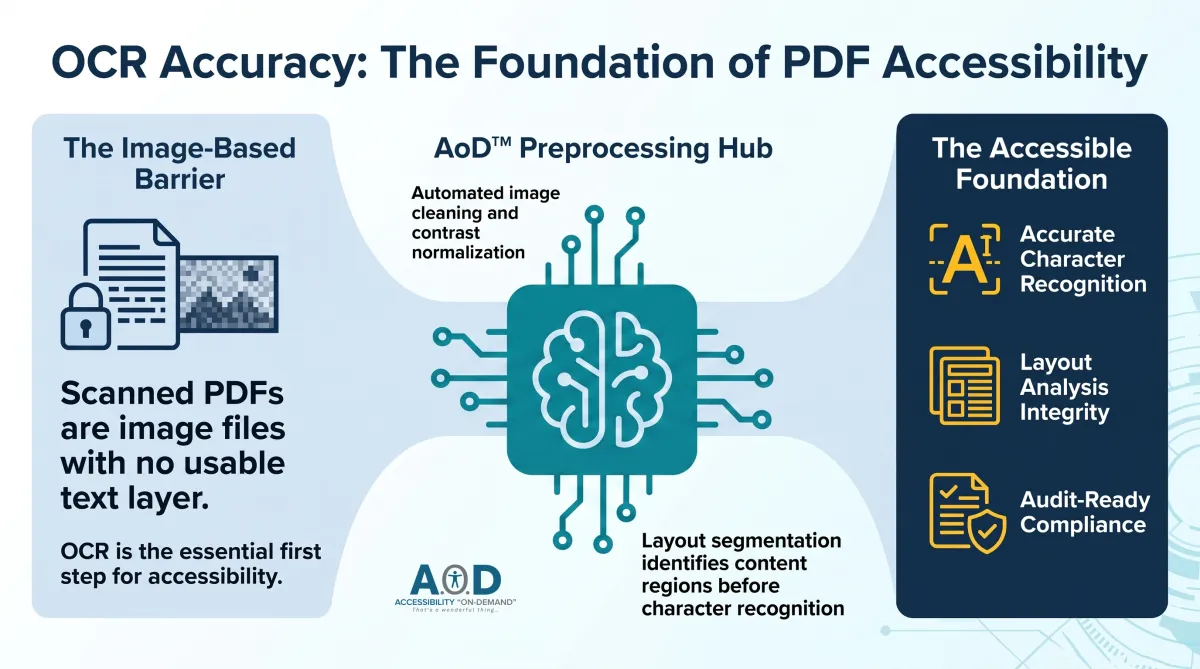
Scanned PDFs are image files with no usable text layer. Accessibility remediation on these documents starts with OCR, not tagging. If the OCR output is wrong, everything built on top of it is wrong too.
A significant share of most legacy PDF inventories consists of scanned documents: PDFs created by scanning paper, photographing a page, or printing a digital document and scanning it back. The result is an image file in a PDF wrapper. To a sighted user, it reads fine. To a screen reader, it contains nothing. No text layer exists to announce, navigate, or tag.
Before any accessibility tagging can begin on a scanned PDF, OCR must reconstruct a text layer from the image. That text layer becomes the foundation for every accessibility element that follows: headings, paragraphs, reading order, alt text, table structure, form fields. OCR accuracy at this stage is not incidental. It determines the integrity of the entire remediated document.
Why OCR Accuracy Is an Accessibility Requirement
OCR is sometimes treated as a preprocessing step separate from accessibility work. That framing is wrong in a compliance context. OCR output is the text that gets tagged. It becomes the alt text pool. It is what the structure-detection engine uses to sequence the tag tree. It is the content a screen reader user will hear.
A word misread by OCR appears in the tag tree as the wrong word. A heading misidentified as body text by the OCR layout engine gets tagged as a paragraph, breaking heading hierarchy and SC 2.4.6 compliance. A table column misread as a list gets tagged without header associations, breaking SC 1.3.1. A page number the OCR places in the main content flow gets tagged as content and interrupts reading order on every page.
None of these errors surface in an automated compliance check that runs after tagging. The checker confirms tags exist and structure is present. It does not know the tags reflect OCR errors rather than the document's actual content. The error propagates through the tag tree undetected until a user encounters it.
Document Characteristics That Affect OCR Accuracy
OCR accuracy varies significantly by document characteristics. Understanding which characteristics affect recognition quality is essential for configuring appropriate review thresholds and setting realistic throughput expectations in the remediation workflow.
Low scan resolution: Documents scanned below 300 DPI produce images where characters are insufficiently defined for reliable recognition. Serif fonts, small type, and documents with significant background noise are particularly vulnerable. Legacy scanned archives often contain substantial volumes of lower-resolution material.
Document aging and degradation: Yellowed paper, ink fade, physical damage, fold lines, and staining all reduce OCR accuracy. Historical government records, older legal documents, and archived correspondence, and institutional files spanning decades frequently exhibit these characteristics across every vertical.
Handwritten content: Standard OCR is optimized for printed text and is not designed for handwriting recognition. Documents that mix printed and handwritten content produce unreliable OCR output for the handwritten portions. The printed structure can be recovered accurately; handwritten fills require a separate handling path.
Complex table structures: Tables with irregular borders, merged cells, ruled lines that fade or break, or columns separated by white space rather than visible borders may be misread as prose, lists, or disconnected text blocks.
Multi-column layouts: Two-column documents require the OCR engine to correctly identify column boundaries and serialize text column by column. Layout analysis failures produce content where words from adjacent columns are interleaved.
Low-contrast originals: Light-colored text on white or near-white backgrounds, watermarked documents, and reverse-print sections all reduce character recognition rates.
What Accurate OCR for Accessibility Remediation Requires
OCR for accessibility remediation requires a higher accuracy bar than OCR for full-text search. Full-text search remains useful with a 2% character error rate. A tag tree built on a 2% character error rate across a 50-page document contains errors on most pages. For a compliance record intended to withstand audit review, that is not an acceptable output.
Beyond character-level accuracy, OCR for accessibility requires layout analysis accuracy. The engine must correctly identify column boundaries, heading levels, table structure, figure regions, running headers and footers, page numbers, captions, and sidebars. A correct character recognition rate combined with incorrect layout analysis produces a document with correct words in wrong structural positions, which is just as unusable as character-level errors.
Accessibility on Demand™ (AoD) runs a preprocessing layer before OCR on image-based documents. It analyzes image quality, identifies scan artifacts, applies contrast normalization and de-skewing where needed, and segments the page layout before character recognition runs. Layout segmentation produces a map of content regions, structural elements, and non-content areas that guides both OCR processing and subsequent tagging.
Evaluating OCR Accuracy in Platform Selection
Platform demonstrations use clean, high-resolution scanned documents. Test a representative sample of your normal inventory. Then add a more informative test using the worst quartile of your actual inventory: oldest documents, lowest-resolution scans, most degraded originals, most complex layouts. This is where capability differences become visible.
The evaluation protocol should include:
Character-level accuracy testing: Extract OCR text output from ten representative documents across the quality range. Compare against source documents manually. Calculate character error rate and word error rate. A platform used for accessibility remediation at scale should identify documents outside acceptable accuracy thresholds and route them to review rather than silently producing low-accuracy output.
Layout analysis verification: For multi-column documents, verify OCR text is serialized in column order. For tabled documents, verify table structure is preserved in the OCR output rather than flattened to prose.
Heading identification: Verify headings in the source document are identified as headings in the OCR layout output at the correct level, not tagged as large-font body text.
Header and footer isolation: Verify running headers and footers in multi-page documents are tagged as Artifacts, not included in the main content flow.
Then open the remediated document in NVDA or JAWS and navigate by heading, by paragraph, and through any tables. OCR errors, if present, will be apparent as garbled words, mis-sequenced content, or structural elements announced in the wrong order.
Volume Considerations for Scanned Document Inventories
Scanned documents take longer to process than documents with native text layers. OCR, preprocessing, and layout analysis add time per document that does not apply to text-native PDFs. For organizations with large scanned archives, this affects batch planning.
Organizations with long institutional histories, including those in public sector, higher education, healthcare, and enterprise contexts, often carry substantial scanned document volumes in their archives. The proportion varies by sector and by how recently digitization programs were implemented. When scoping a remediation project, estimating the proportion of the inventory that is image-based versus text-native PDFs informs both throughput planning and timeline modeling. That proportion determines the processing capacity required to clear the backlog within the available compliance window.
AoD handles image-based PDFs through the same tiered remediation pipeline as text-native documents, with OCR preprocessing integrated into the ingestion stage. Organizations can configure priority queuing to ensure that high-volume scanned backlogs process against compliance deadlines without blocking time-sensitive text-native documents. Because OCR and tagging run as a continuous pipeline rather than sequential manual stages, throughput on scanned documents scales with volume rather than specialist headcount.
Frequently Asked Questions
Why do scanned PDFs require different accessibility treatment than standard PDFs?
Standard PDFs contain a text layer that machine-readable tools can access directly. Scanned PDFs contain images of text rather than text itself. There is no machine-readable content for a screen reader to announce. Before accessibility tagging can be applied, OCR must reconstruct a text layer from the image. The accuracy of that reconstruction determines the quality of everything built on top of it: the tag tree, reading order, heading structure, table markup, and the content a screen reader user will hear. Poor OCR accuracy produces a tagged document that is technically structured but carries incorrect or garbled content.
What scan resolution is required for accurate OCR in accessibility remediation?
300 DPI is the minimum for reliable OCR accuracy on standard printed text with common fonts and good contrast. Documents scanned below 300 DPI produce recognition errors that increase with lower resolution. 400 DPI or higher is preferable for small type, damaged originals, or complex layouts. For organizations with existing archives that include lower-resolution material, the practical approach is to flag documents below resolution thresholds during preprocessing, apply contrast normalization and upscaling where available, and route results to manual review when confidence scores fall below acceptable levels rather than producing low-accuracy output that gets tagged and distributed.
About Accessibility on Demand™
Automation-first by design, not by compromise. Delivering compliance, speed, and cost-savings in one solution.
Accessibility on Demand™ (AoD) is an enterprise-grade, AI-powered PDF remediation platform designed for automation-first accessibility workflows, helping organizations make inaccessible PDFs compliant, audit-ready assets at scale without operational friction.
For organizations where accessibility is a strategic priority, AoD brings precision, speed, and control to a process that is too often fragmented and costly. It converts PDFs into WCAG 2.1 Level AA, PDF/UA, ADA, and Section 508-aligned documents in minutes, with up to 95% automation, delivering both measurable cost reduction and defensible compliance evidence.
Built for CIOs, IT leaders, and accessibility teams, AoD replaces labor-intensive remediation with intelligent automation across OCR, document structure tagging, reading order, meaningful alternative text, complex tables, formulas, and fillable forms. The result is a refined, scalable compliance operation that supports consistency, efficiency, and long-term governance.
AoD deploys as a self-service portal or integrates directly into enterprise document management and intelligent document processing pipelines via API, embedding accessibility upstream and preserving continuity across existing workflows.
AoD serves organizations across SLED, healthcare, federal government, higher education, financial services, insurance, and legal sectors, where document complexity is high, compliance expectations are rising, and the cost of inaccessibility is meaningful.
For organizations navigating ADA Title II, ADA Title III, Section 504, Section 508, AODA, and evolving accessibility requirements, AoD offers a partner-neutral path to compliance defined by precision, scalability, and measurable business impact.
Enterprise capabilities
API integration for upstream remediation within existing workflows and IDP stacks.
High-volume batch processing for large files and repositories.
Third-party validation with WCAG and PDF/UA compliance scoring.
Section 508- and ADA-aligned outputs with audit-ready reporting.
Dedicated account management and enterprise support.
Comprehensive onboarding and platform training.
For remediation professionals
For remediation professionals, AoD is built for the scale of what comes next. It handles the majority of the heavy lifting, including automated tagging, reading order, contextual alt-text metadata, and document structure, then delivers a complete tag tree so specialists can focus on the judgment, nuance, refinement, and governance decisions. At the center of accessibility is one essential truth: documents must be genuinely usable for the people who depend on them. Together, we can take on the trillions of pages ahead and raise the standard for what accessibility can be.
Beat the Deadlines: Talk with a PDF Accessibility Specialist
The bar for IT accessibility in the public sector is rising. If your organization is navigating ADA compliance, WCAG requirements, or Section 508 accessibility and struggling to understand what applies to your PDF documents. Discover how AoD can ensure your organization stays ahead of accessibility deadlines, clarify scope, risk, and next steps.
Convenient External Links to learn more:
Visit our Homepage and watch the AoD Demo (2min 33sec)
Enjoy AoD's Blog: Accessibility Insights
To Sign-up for a free trial of AoD or need help navigating ADA Title II regulations, visit: Book a Demo
External Links to Additional Resources:
W3C: Web Content Accessibility Guidelines (WCAG) 2.1
Section 508 Standards: https://www.section508.gov/
ADA: Exceptions
First Steps Toward Compliance: https://www.ada.gov/resources/web-rule-first-steps/
DOJ Title II Web Accessibility Final Rule: https://www.ada.gov/resources/2024-03-08-web-rule/
