Fillable Form Accessibility at Scale: What SC 4.1.2 Requires in High-Volume Document Environments
By Accessibility on Demand | A Netra Labs Publication | Technical Implementation Series | Article 4
Fillable PDF forms are the highest-risk document category in most high-volume document environments. They are also the category that most remediation tools handle least reliably.
A permit application that a screen reader user cannot complete. A patient intake form with unlabeled fields. A financial aid submission where the tab order jumps unpredictably between sections. A benefits enrollment form that announces no field names. These are not edge cases. They occur across state and local government, higher education, healthcare, and enterprise document inventories. Organizations in each of these sectors should consult qualified counsel regarding the accessibility obligations applicable to their specific context.
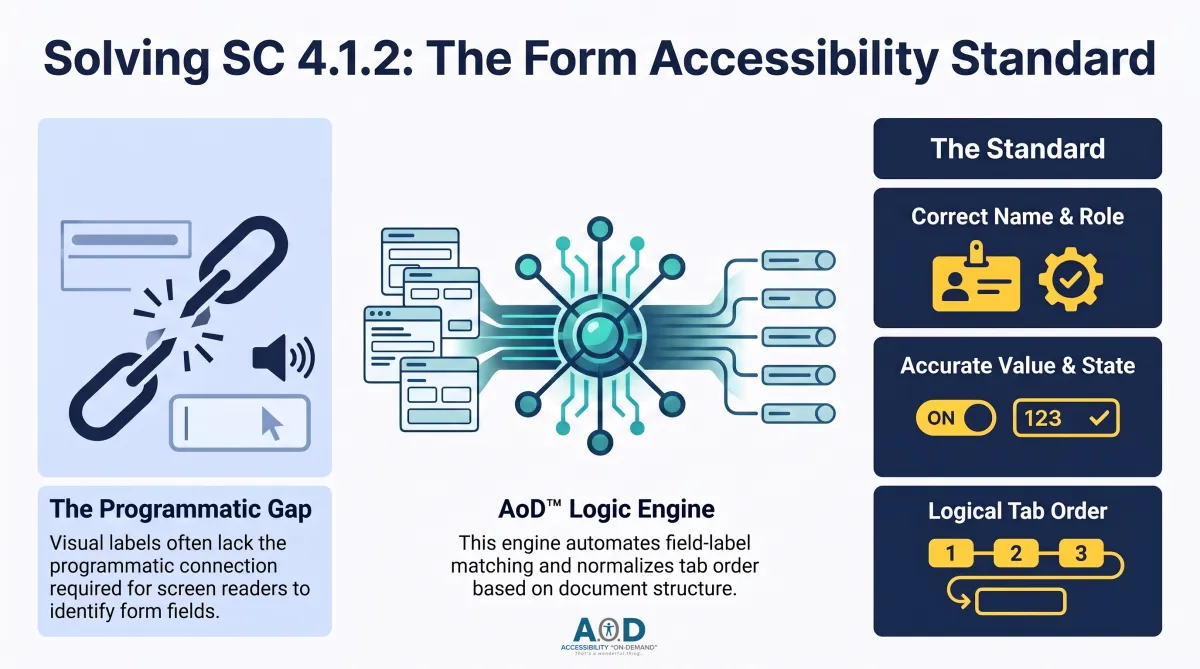
WCAG 2.1 AA SC 4.1.2 (Name, Role, Value) requires that every user interface component, including every field in a fillable PDF, have a programmatic name, an identified role, and a state or value that the user can set and that assistive technology can read. For HTML, browsers and semantic markup handle most of this automatically. For fillable PDFs, it requires explicit field-level accessibility work that most authoring tools never perform. The gap between a visually functional form and a programmatically accessible one is wide, and it is not visible to anyone who does not test with assistive technology.
The Field-Level Standard for SC 4.1.2
The requirements are specific and non-negotiable. For each interactive field in a PDF form:
Text input fields: Each field must carry a tooltip or associated label that describes its purpose specifically. 'Last Name' is valid. 'Field 3' is not. The association must be programmatic, not just visual proximity on the page.
Checkboxes and radio buttons: Each control must have a name describing the option, a group association identifying which question it belongs to, and a role identifying it as a checkbox or radio button. A group of radio buttons identified only by their visual proximity to a question fails SC 4.1.2 regardless of how the question is formatted.
Dropdown menus and list boxes: Each control must carry a name describing what is being selected, a list of available options that is programmatically accessible, and a role identifying the control type.
Required field indicators: Visual asterisks or color cues indicating required fields do not satisfy SC 4.1.2. Required status must be set as a field property, not communicated through visual formatting alone.
Tab order: The navigation sequence through fields must be logical and programmatically defined. A tab order that skips fields, jumps between sections, or circles back fails the interaction even when individual fields are correctly labeled.
Common Patterns That Require Remediation
Most fillable PDF forms in high-volume document environments were not built with accessibility in mind. They were created in a form editor or exported from a document authoring tool, and the field properties SC 4.1.2 requires were never set. This is true across government, higher education, healthcare, and enterprise inventories in roughly equal measure. The most common failure patterns are:
Missing field labels: Fields have no tooltip or associated label property. The visual label, if present, is a separate text element on the page with no programmatic connection to the field.
Generic field names: Fields are named by position rather than purpose: TextField1, TextField2.
Unassociated radio button groups: Individual buttons are labeled but not grouped. A screen reader announces each button's label without any question context.
Incorrect tab order: The tab sequence follows the order fields were added to the form rather than a logical completion sequence.
Visual-only required indicators: Required fields are marked with a red asterisk in the visual design but carry no required-field property in the PDF field definition.
JavaScript-dependent validation: Fields with JavaScript validation that fires on input may not surface error messages accessibly to screen readers. Validation that announces errors visually but not programmatically leaves the user unable to identify or correct the problem without sighted assistance.
What Automation Can Handle and Where It Stops
Automated remediation handles standard fillable form accessibility reliably when fields are built with common field types and clear visual label associations. When a field is positioned immediately adjacent to a text label, the Accessibility on Demand™ (AoD) structure-detection engine identifies the label-field relationship and sets the field’s tooltip property to the label text. Standard field roles are assigned from the field type. Tab order is normalized to visual reading order. For the majority of well-structured forms across any vertical, this process runs without requiring manual intervention.
The limits are real and worth stating precisely. Fields with labels not visually adjacent, positioned above a block of fields or embedded in a complex grid, may not be correctly matched by automated analysis. These are flagged in the Review Module for manual label assignment. The Review Module differentiator is not that it exists: it is what arrives in it.
Radio button group associations require that the grouping logic be inferable from the document structure. Groups that are visually distinct but structurally unmarked may not be correctly identified by automated processing. Where grouping cannot be determined, those controls are flagged for manual review rather than assigned a potentially incorrect association.
Forms with conditional field logic, where field visibility or availability changes based on other field inputs, require JavaScript to function. Automated tagging can confirm that static fields are correctly labeled. It cannot test whether the dynamic behavior triggered by JavaScript interactions is accessible. Forms with significant conditional logic may need manual testing in a screen reader to verify dynamic accessibility.
Evaluating Platform Capability Against Your Own Form Inventory
The evaluation mistake most organizations make is testing an accessibility platform against simple, clean PDF forms that any tool handles adequately. The test that reveals actual platform capability is running it against your most complex forms: permit applications, patient intake and consent forms, financial aid submissions, multi-page benefit enrollment forms, licensing submissions with conditional sections, forms built from legacy templates with non-standard field arrangements.
Ask specifically during a platform evaluation: how does the tool handle forms where the visual label is not directly adjacent to the field? What does it do with radio button groups where the question is formatted as a heading above the buttons? Can you inspect the resulting field properties in a PDF editor after remediation to verify that names, roles, and tab order are set correctly?
Then open the remediated form in JAWS or NVDA and complete it from start to finish using only the keyboard. If field names are announced correctly, the tab sequence is logical, and required fields are identified before submission, the platform handled the form. If any of those checks fail, trace the specific field property that was not set and identify where in the remediation process it was missed.
For organizations with large inventories of complex interactive forms, form-handling capability is the threshold question in platform selection. It is also the question most vendors answer least specifically in sales conversations. Request a live demonstration on your own forms before committing to any platform. The difference between platforms shows up on your most difficult documents, not the samples a vendor provides.
Where Forms Rank in the Remediation Priority Order
ADA Title II covers all digital content provided by public entities to the public, including forms used for applications, registrations, complaints, and other interactions. Section 508 extends equivalent requirements to federal agencies and their contractors. Organizations in higher education, healthcare, and enterprise contexts operate under a range of federal, state, and sector-specific accessibility obligations that vary by funding source, jurisdiction, and organizational type. The applicable framework for any given organization should be confirmed with qualified counsel.
What holds across all contexts is the operational reality: interactive forms in public-facing workflows are among the highest-risk document categories in any inventory, and the April 2027 Title II deadline applies to covered entities regardless of sector.
Across every vertical, the form inventory carries more compliance risk than the general document inventory. An inaccessible informational PDF is a barrier to information. An inaccessible application form is a barrier to the service itself. A person with a disability who cannot independently submit a permit application, complete a patient intake form, file a financial aid request, or enroll in a benefits program cannot access that service on equal terms. Organizations building their remediation priority queue should place interactive forms at the top, above informational documents, regardless of sector.
About Accessibility on Demand™
Automation-first by design, not by compromise. Delivering compliance, speed, and cost-savings in one solution.
Accessibility on Demand™ (AoD) is an enterprise-grade, AI-powered PDF remediation platform designed for automation-first accessibility workflows, helping organizations make inaccessible PDFs compliant, audit-ready assets at scale without operational friction.
For organizations where accessibility is a strategic priority, AoD brings precision, speed, and control to a process that is too often fragmented and costly. It converts PDFs into WCAG 2.1 Level AA, PDF/UA, ADA, and Section 508-aligned documents in minutes, with up to 95% automation, delivering both measurable cost reduction and defensible compliance evidence.
Built for CIOs, IT leaders, and accessibility teams, AoD replaces labor-intensive remediation with intelligent automation across OCR, document structure tagging, reading order, meaningful alternative text, complex tables, formulas, and fillable forms. The result is a refined, scalable compliance operation that supports consistency, efficiency, and long-term governance.
AoD deploys as a self-service portal or integrates directly into enterprise document management and intelligent document processing pipelines via API, embedding accessibility upstream and preserving continuity across existing workflows.
AoD serves organizations across SLED, healthcare, federal government, higher education, financial services, insurance, and legal sectors, where document complexity is high, compliance expectations are rising, and the cost of inaccessibility is meaningful.
For organizations navigating ADA Title II, ADA Title III, Section 504, Section 508, AODA, and evolving accessibility requirements, AoD offers a partner-neutral path to compliance defined by precision, scalability, and measurable business impact.
Enterprise capabilities
API integration for upstream remediation within existing workflows and IDP stacks.
High-volume batch processing for large files and repositories.
Third-party validation with WCAG and PDF/UA compliance scoring.
Section 508- and ADA-aligned outputs with audit-ready reporting.
Dedicated account management and enterprise support.
Comprehensive onboarding and platform training.
For remediation professionals
For remediation professionals, AoD is built for the scale of what comes next. It handles the majority of the heavy lifting, including automated tagging, reading order, contextual alt-text metadata, and document structure, then delivers a complete tag tree so specialists can focus on the judgment, nuance, refinement, and governance decisions. At the center of accessibility is one essential truth: documents must be genuinely usable for the people who depend on them. Together, we can take on the trillions of pages ahead and raise the standard for what accessibility can be.
Beat the Deadlines: Talk with a PDF Accessibility Specialist
The bar for IT accessibility in the public sector is rising. If your organization is navigating ADA compliance, WCAG requirements, or Section 508 accessibility and struggling to understand what applies to your PDF documents. Discover how AoD can ensure your organization stays ahead of accessibility deadlines, clarify scope, risk, and next steps.
Convenient External Links to learn more:
Visit our Homepage and watch the AoD Demo (2min 33sec)
Enjoy AoD's Blog: Accessibility Insights
To Sign-up for a free trial of AoD or need help navigating ADA Title II regulations, visit: Book a Demo
External Links to Additional Resources:
W3C: Web Content Accessibility Guidelines (WCAG) 2.1
Section 508 Standards: https://www.section508.gov/
ADA: Exceptions
First Steps Toward Compliance: https://www.ada.gov/resources/web-rule-first-steps/
DOJ Title II Web Accessibility Final Rule: https://www.ada.gov/resources/2024-03-08-web-rule/
