The Document Inventory Problem: Finding Every Inaccessible PDF Before an Audit Begins
By Accessibility on Demand | A Netra Labs Publication | Technical Implementation Series | Article 6
The first question in any PDF accessibility compliance program is one most organizations cannot answer with confidence: how many PDFs exist across the environment, where do they live, and which ones are in scope? Until that question has a defensible answer, everything else is guesswork.
An accessibility audit does not announce itself in advance. A DOJ complaint, an OCR investigation, or a document request from plaintiff’s counsel arrives and asks about specific documents, often documents the organization did not realize were public-facing or in scope. The organizations best positioned to respond are the ones that already know the answer before the question is asked.
The organizations that handle those requests most efficiently have already built a PDF accessibility document inventory: a centralized record of every PDF in the organization’s digital environment, categorized by location, traffic volume, compliance risk, and remediation status. Without that inventory in place, the discovery process begins only once the request arrives, under far less favorable time pressure.
Define Scope Before Discovering Volume
The scope question comes before the discovery question. In general terms, ADA Title II covers web content and electronic documents made available to the public by state and local government entities, which extends to most SLED organizations. Section 508 applies to electronic content made available to federal employees and members of the public through federally funded programs. Many higher education institutions and healthcare systems fall under Section 504 obligations tied to federal funding, and enterprise organizations may face state-level or sector-specific accessibility requirements depending on their industry. The EU Accessibility Act applies to digital products and services offered to EU residents. Scope determinations for any specific organization depend on its structure, funding sources, and jurisdiction, and should be confirmed with qualified legal counsel.
In practice, organizations generally treat the following as in scope: every PDF on a public-facing website, PDFs distributed by email to constituents, patients, students, applicants, or customers, and PDFs downloadable from a government portal, a patient or student portal, a benefits system, or a licensing platform. Internal documents distributed only to employees may fall outside ADA Title II public accommodation scope but can remain in Section 508 scope for federal contractors and agencies. These are general patterns rather than universal rules, and the specific scope boundary for any organization should be set in consultation with legal counsel.
Before discovery begins, define the boundary. Which systems publish PDFs externally? Which distribute PDFs to constituents, patients, students, or customers, even outside a public website? Which vendor-generated documents carry the organization's name and are distributed to those audiences? These are compliance and legal decisions. IT implements discovery within the defined scope.
Where Inaccessible PDFs Hide Across Large Document Environments
The visible inventory is the easy part. PDFs on the public website sitemap are discoverable by standard crawling tools. The harder inventory does not appear in a sitemap.
Document management systems: SharePoint, Laserfiche, OpenText, and similar platforms store thousands of PDFs in libraries that may be publicly accessible by direct URL even if not linked from the public website.
CMS attachment repositories: Content management systems store uploaded PDFs in attachment directories separate from page content. Pages that once linked to a document but no longer do may leave orphaned PDFs still accessible at their original URLs.
Department-managed microsites and portals: IT does not always control every public-facing web presence. Departments, schools, clinics, or business units that manage their own sites or constituent-facing applications may publish PDFs independently of the main publishing workflow.
Vendor-generated and third-party hosted documents: Annual reports, audit documents, grant agreements, and similar materials may be hosted on third-party platforms but branded as the organization's content and linked from official channels.
Legacy archived content: Organizations with long institutional histories frequently carry years of archived documents at persistent URLs, including documents published before current accessibility requirements took effect. This is common across government, higher education, and healthcare systems with deep digital archives. Those documents typically remain publicly accessible and in scope going forward, regardless of when they were originally published.
Email and direct distribution: PDFs distributed directly to constituents, patients, students, or customers by email or through case management and records systems never appear in a web crawler but commonly fall within scope under the effective communication principles that inform ADA Title II and equivalent frameworks.
Building the PDF Accessibility Document Inventory
A complete inventory requires combining automated discovery with manual scoping for sources that automated tools cannot reach.
Automated web crawling identifies PDFs linked from public-facing pages. Configure the crawler for the organization's primary domain and all known subdomains, set to follow all links and log all PDF URLs encountered. Run it against robots.txt-excluded directories as well. Accessibility obligations do not follow robots.txt exclusions.
Document management system exports require a different approach. SharePoint, Laserfiche, and OpenText all support administrative content reports filtered for PDF file type across document libraries with any public or external access configuration. The output is a list of PDFs stored in those systems. Cross-reference against publicly accessible URL patterns to identify which are reachable without authentication.
For each PDF discovered, the inventory record should capture: URL or storage path, document title where available, file size, last modified date, page count, and whether a text layer is present. That last field matters for remediation planning. Image-based PDFs require OCR before tagging and take significantly longer to process.
Prioritizing the Inventory for Remediation
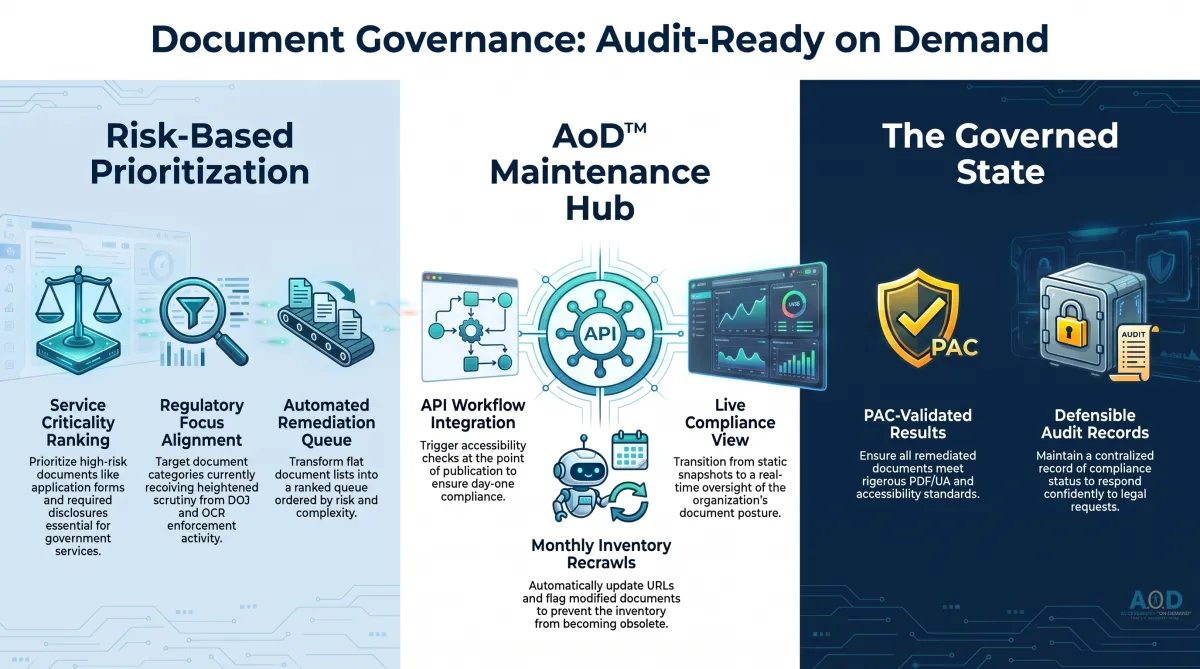
Not all in-scope PDFs carry equal compliance risk. An organization with 50,000 PDFs does not remediate them all at equal priority. Several factors should drive the ranking.
Traffic volume: High-traffic documents create more potential accessibility barriers. A document downloaded 5,000 times per month is more exposed than one downloaded twice. Traffic data from web analytics, tied to document URLs, is the most reliable proxy for usage.
Service criticality: Documents required to access a service carry materially higher compliance risk than informational documents. Application forms, patient intake and consent forms, financial aid and enrollment documents, complaint forms, and required disclosures are the highest-priority category for this reason, across every vertical.
Current compliance status: Documents that fail structural analysis during inventory classification carry indicators consistent with accessibility barriers. Documents with no text layer and no remediation history warrant high-priority review by default.
Regulatory focus areas: DOJ enforcement activity, recent settlements, and OCR complaint patterns signal which document categories are receiving heightened scrutiny. Organizations in sectors with recent enforcement actions should prioritize documents in those categories.
The output is a remediation queue ordered by risk score, with estimated processing complexity and timeline.
Keeping the Inventory Current
A PDF accessibility document inventory built once and not maintained delivers value for exactly one audit cycle. After that, it reflects a document set that no longer exists, and the gap between the record and reality only widens.
Organizations publish new PDFs continuously. Old documents are updated, replaced, or taken down. Department microsites add and remove content. The inventory needs a maintenance model that keeps it accurate as the document set evolves.
Accessibility on Demand’s API integration into publishing workflows addresses the new document problem directly. When accessibility checking runs at the point of publication, every new PDF that enters the public-facing inventory is checked on arrival. Its compliance status is known from day one. The inventory record for new documents is created automatically as a byproduct of the remediation workflow.
For existing documents, a monthly recrawl cadence updates the inventory with new URLs, removes documents no longer reachable, and flags modified documents for re-evaluation. A document with a last-modified date more recent than its last remediation date is a document that needs to be reviewed.
The compliance posture that emerges from a maintained inventory looks categorically different from a point-in-time remediation project. It is not a snapshot of compliance on a specific date. It is a live view of the organization's document accessibility status, available on demand rather than reconstructed under pressure.
About Accessibility on Demand™
Automation-first by design, not by compromise. Delivering compliance, speed, and cost-savings in one solution.
Accessibility on Demand™ (AoD) is an enterprise-grade, AI-powered PDF remediation platform designed for automation-first accessibility workflows, helping organizations make inaccessible PDFs compliant, audit-ready assets at scale without operational friction.
For organizations where accessibility is a strategic priority, AoD brings precision, speed, and control to a process that is too often fragmented and costly. It converts PDFs into WCAG 2.1 Level AA, PDF/UA, ADA, and Section 508-aligned documents in minutes, with up to 95% automation, delivering both measurable cost reduction and defensible compliance evidence.
Built for CIOs, IT leaders, and accessibility teams, AoD replaces labor-intensive remediation with intelligent automation across OCR, document structure tagging, reading order, meaningful alternative text, complex tables, formulas, and fillable forms. The result is a refined, scalable compliance operation that supports consistency, efficiency, and long-term governance.
AoD deploys as a self-service portal or integrates directly into enterprise document management and intelligent document processing pipelines via API, embedding accessibility upstream and preserving continuity across existing workflows.
AoD serves organizations across SLED, healthcare, federal government, higher education, financial services, insurance, and legal sectors, where document complexity is high, compliance expectations are rising, and the cost of inaccessibility is meaningful.
For organizations navigating ADA Title II, ADA Title III, Section 504, Section 508, AODA, and evolving accessibility requirements, AoD offers a partner-neutral path to compliance defined by precision, scalability, and measurable business impact.
Enterprise capabilities
API integration for upstream remediation within existing workflows and IDP stacks.
High-volume batch processing for large files and repositories.
Third-party validation with WCAG and PDF/UA compliance scoring.
Section 508- and ADA-aligned outputs with audit-ready reporting.
Dedicated account management and enterprise support.
Comprehensive onboarding and platform training.
For remediation professionals
For remediation professionals, AoD is built for the scale of what comes next. It handles the majority of the heavy lifting, including automated tagging, reading order, contextual alt-text metadata, and document structure, then delivers a complete tag tree so specialists can focus on the judgment, nuance, refinement, and governance decisions. At the center of accessibility is one essential truth: documents must be genuinely usable for the people who depend on them. Together, we can take on the trillions of pages ahead and raise the standard for what accessibility can be.
Beat the Deadlines: Talk with a PDF Accessibility Specialist
The bar for IT accessibility in the public sector is rising. If your organization is navigating ADA compliance, WCAG requirements, or Section 508 accessibility and struggling to understand what applies to your PDF documents. Discover how AoD can ensure your organization stays ahead of accessibility deadlines, clarify scope, risk, and next steps.
Convenient External Links to learn more:
Visit our Homepage and watch the AoD Demo (2min 33sec)
Enjoy AoD's Blog: Accessibility Insights
To Sign-up for a free trial of AoD or need help navigating ADA Title II regulations, visit: Book a Demo
External Links to Additional Resources:
W3C: Web Content Accessibility Guidelines (WCAG) 2.1
Section 508 Standards: https://www.section508.gov/
ADA: Exceptions
First Steps Toward Compliance: https://www.ada.gov/resources/web-rule-first-steps/
DOJ Title II Web Accessibility Final Rule: https://www.ada.gov/resources/2024-03-08-web-rule/
