Best PDF accessibility remediation software (2026)
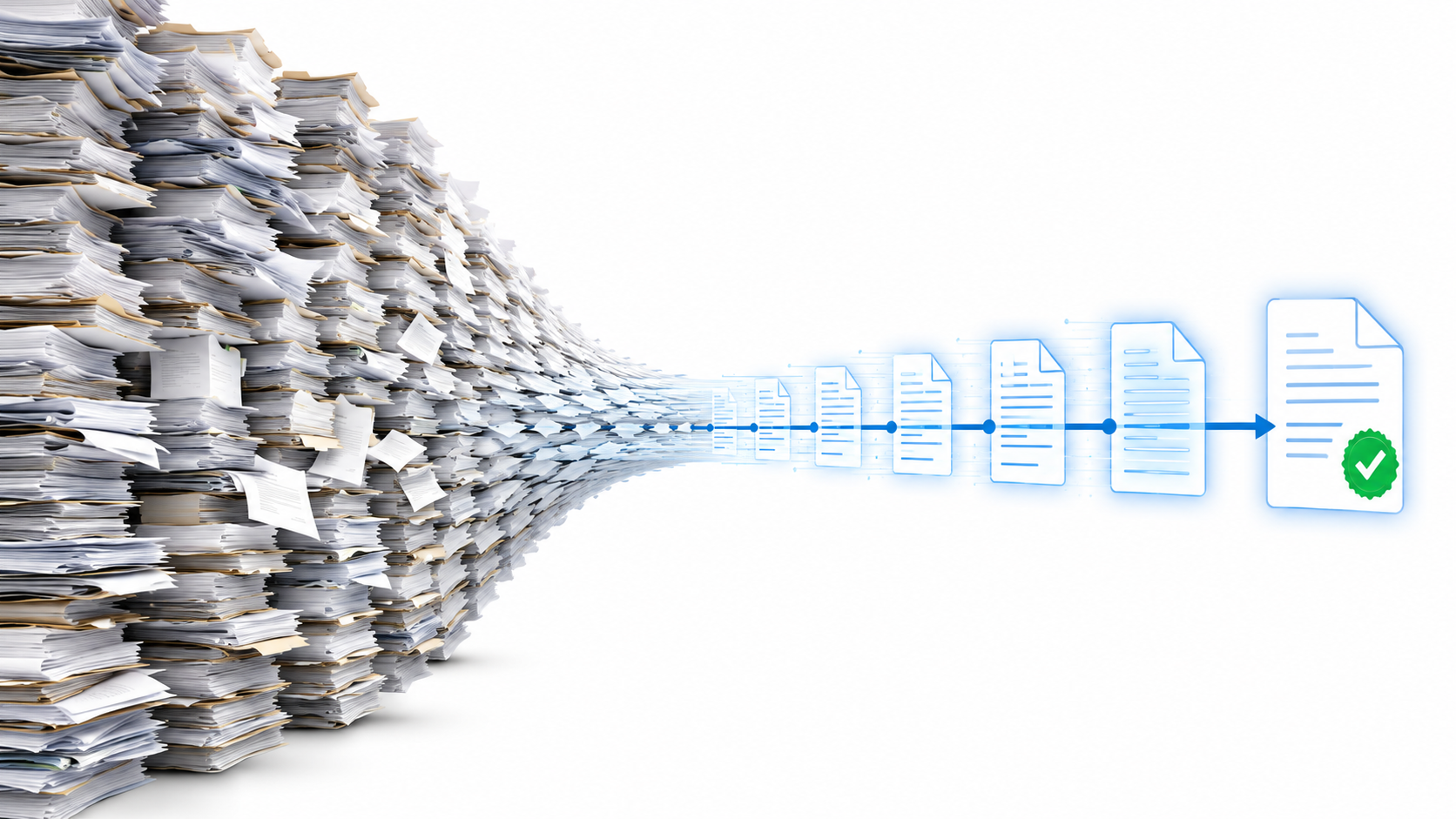
Most vendors in this market hide their pricing, skip batch‑processing details, and cover one compliance standard while implying they cover them all. If you are clearing a backlog of thousands or millions of pages, that opacity costs you real money. Adobe's own research found that over 90% of PDFs are not fully accessible (Adobe, 2023), so almost every organization is sitting on some version of this problem.
The short answer: for backlogs in the thousands‑to‑millions range, automated remediation with published per‑page pricing and third‑party verification; for a handful of documents a year, a desktop editor and a trained specialist.
Table of contents
Accessibility On Demand™ — fully automated remediation at backlog scale
Adobe Acrobat Pro — the standard desktop remediation environment
CommonLook — guided, auditable remediation for remediation experts
Equidox — zone-based remediation for templated and scanned documents
DocAccess — HTML transcripts beside the PDF, not remediation of it
Continual Engine PREP — AI-assisted remediation for education workflows
Screen reader testing with NVDA, VoiceOver, and JAWS — the manual final check
Then: how to choose (including the cloud vs- on‑premises question), a comparison table, and an FAQ.
1. Accessibility On Demand™ — fully automated remediation at backlog scale
Full disclosure first: Accessibility On Demand™ is our platform. We are putting it at the top of our own list, so here is exactly where it fits and where it does not.
AoD is built for one problem: document backlogs too large for manual remediation to ever finish. State and local government, federal agencies, healthcare systems, and higher education routinely face backlogs of hundreds of thousands of pages. At those volumes, a fully automated pipeline is the only math that works. In May 2026 we processed 600,000 pages, including a 50,000-page single‑day run for one customer.
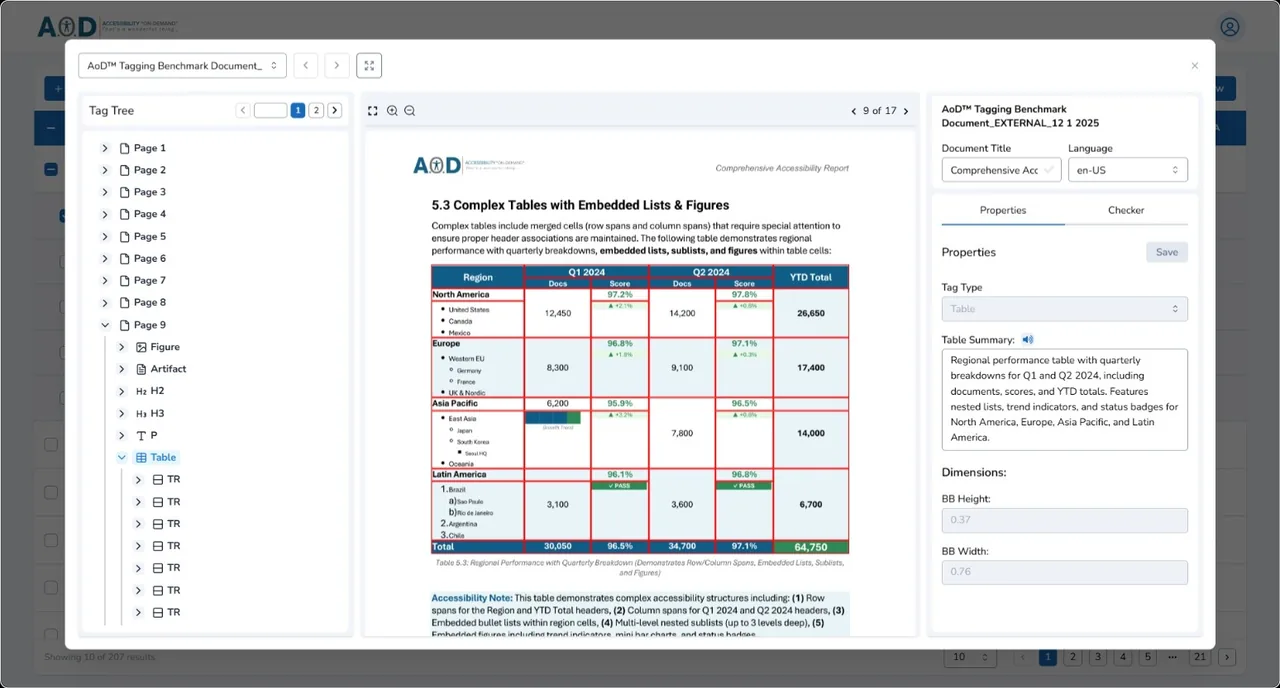
Our pricing is published openly: $0.30 per page for Level 1, $1.80 for Level 2, $12 for complex Level 3 documents (see the published pricing). Level 2 (Enhanced) targets a 95%+ WCAG 2.1 AA Compliance Score, verified by the PAC (Axes4) checker. If a document doesn't clear 95%, you're not charged for it; refinements happen in the Review Modal. Compare that with manual remediation, which runs $5–$25+ per page from specialist firms — and $100+ per page for complex fillable forms.
Output targets WCAG 2.1 AA — the version the ADA Title II rule references — tested to 2.2 AA, and PDF/UA (ISO 14289), which covers the technical obligations under ADA Title II, Section 508, and Section 504. Every processed document is scored through the Axes4 PAC Checker API, the same engine behind the checker auditors actually run, and we are currently benchmarking 97%+ average compliance scores. That score is the floor, not the proof. Supported languages today are English, Spanish, French, German, Italian, and Portuguese, with roughly 100 planned.
One scope boundary worth stating plainly: remediation is not redesign. AoD adds the semantic structure — tags, reading order, alt text, form labels — that makes a document work with assistive technology. It does not change the document's visual appearance, so a source file with a contrast problem keeps that contrast problem, and the score reports it honestly. That is why real scores sit in the high 90s rather than at a round 100 no vendor can substantiate.
The caveat: AoD is a hosted automation service, not a developer toolkit you run on your own servers. If you need SDK‑level hooks inside your own infrastructure, PDFix at #5 is built for that. And if your volume is a handful of documents a year, a desktop tool is cheaper.
Key takeaway: Accessibility On Demand™ is the right fit when the priority is verified, large‑scale remediation at a known per‑page cost. It is the wrong fit for fixing one file at a time on your desktop. You can process your first 100 pages at no cost through the free trial and judge the output yourself.
2. Adobe Acrobat Pro — the standard desktop remediation environment
Acrobat Pro is the tool most accessibility specialists learned on. Its tag tree, reading order panel, and accessibility checker cover every manual remediation task: renaming tags, setting alt text, fixing table scope, correcting tab order on forms. The Section 508 training series from GSA uses Acrobat as its reference environment.
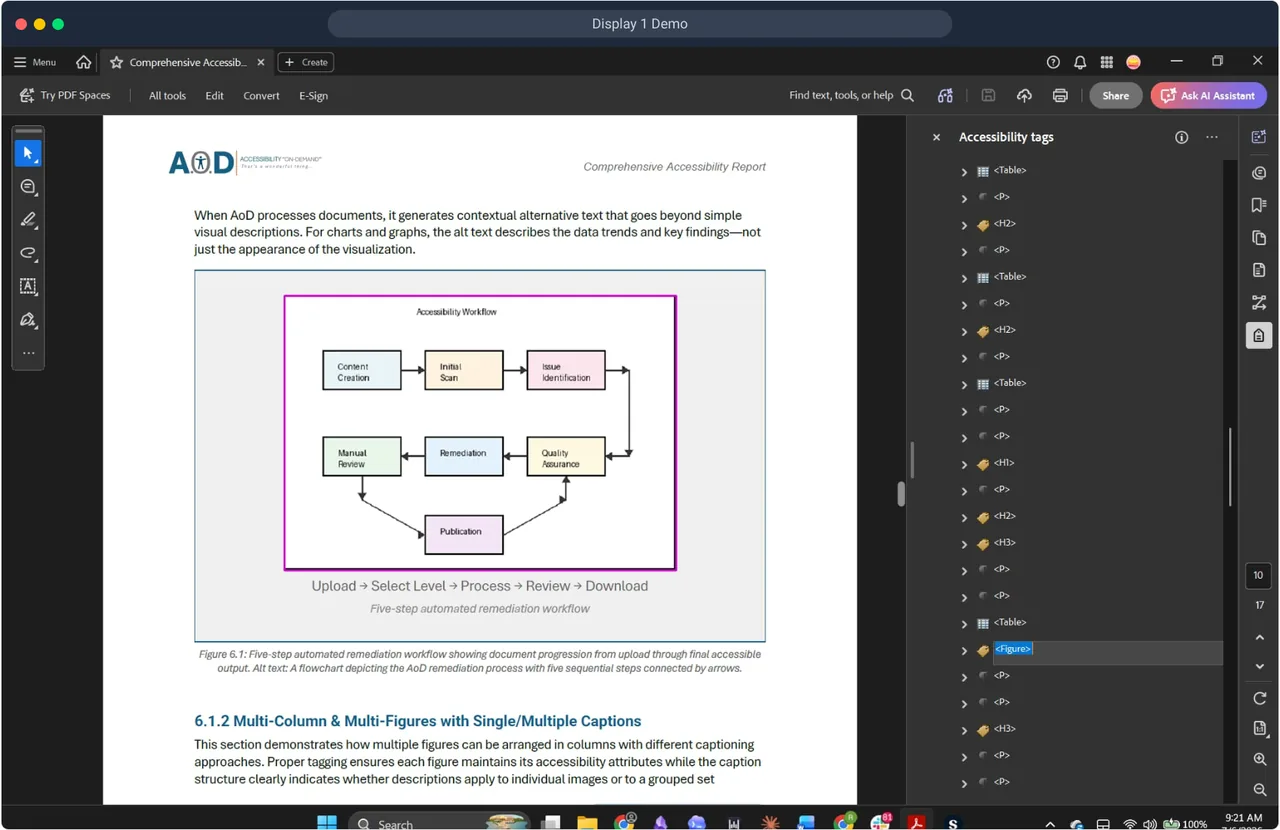
The limits are real. Acrobat has no native batch automation for accessibility tagging, so every document is a manual job. At enterprise scale that is a headcount problem, not a software problem. OCR on scanned files works, but the resulting tag structure usually needs significant cleanup before it passes a PDF/UA validator. And because it is a general‑purpose editor sold by subscription, you pay for features you will not use if accessibility is your whole job. The third‑party PAC checker runs substantially more checks than Acrobat's built‑in checker, so a “pass” in Acrobat is a lower bar than full PDF/UA validation.
The caveat: the right shape for one document at a time, the wrong shape for a backlog.
3. CommonLook — guided, auditable remediation for remediation experts
CommonLook, now part of Allyant, is the established name in specialist PDF remediation. Its tooling sits on top of Acrobat and walks a remediator through a structured compliance workflow mapped to Section 508 and PDF/UA checkpoints, instead of leaving the specialist to interpret a raw error list. Federal agencies and contractors with dedicated accessibility staff standardize on it for a good reason: the per‑document workflow is auditable, and the output maps to documented test procedures. It also handles the hard cases well — complex table structures, mathematical content, form fields — with more granular control than general‑purpose editors offer.
If your organization remediates tens or hundreds of high‑complexity documents a year and has trained specialists on staff, CommonLook is a legitimate answer. It proves any one document is compliant, thoroughly.
The caveat is throughput. CommonLook makes a skilled remediator more consistent; it does not change the per‑document math, because a person still opens, works, and closes every file. At thousands to millions of pages, the constraint becomes skilled‑remediator availability, and no license count fixes that. Pricing is professional licensing, quoted rather than published.
4. Equidox — zone‑based remediation for templated and scanned documents
Equidox, from Onix, takes a different approach to the tag‑tree problem: mostly hiding it. Remediators work with visual zones drawn on the page, and the tool derives the tag structure from the zones. Its Smart Zone Detector uses computer vision to identify elements in PDFs with no existing tags, and zone templates carry a structure from one document to the next. On recurring, consistently laid‑out content — meeting minutes, monthly reports, multi‑language editions — that template reuse saves real time.
The caveat is that the expertise never leaves the operator. Equidox does excellent work in the hands of someone who understands accessible tagging deeply, because it applies exactly what that person defines. The same property makes it hard to roll out across staff who are not tagging specialists: output quality tracks operator skill, and complex or non‑templated layouts still demand expert review. It makes manual remediation faster. It does not remove manual remediation. If your accessibility cost is dominated by people‑hours, Equidox makes those hours more productive; the hours remain.
Worth noting: the two approaches coexist in practice. Some teams keep Equidox for edge cases that need human craft and route bulk volume through automation.
5. PDFix — developer SDK for tagging inside your own pipeline
PDFix is the developer‑first option in this comparison, and a direct alternative to a hosted platform like ours for teams with engineering capacity. The PDFix SDK embeds auto‑tagging into your own content management system or document‑generation workflow, with bindings for Python, C#, Java, C++, and Node.js, batch operation on your own infrastructure, and validation built on the open‑source veraPDF engine. Desktop Pro is $599 per user per year for US customers, published; SDK pricing is quoted by deployment scale.
PDFix says plainly that it is a technology provider, not a service provider, and that full compliance requires human checks on automated output. That is accurate for every tool on this list, ours included, and they deserve credit for saying it.
The caveat: an SDK is a project, not a purchase. You own the integration, the tuning, the QA, and the human review that gets output from machine‑tagged to actually accessible. For engineering teams that want that control, especially with hard on‑premises requirements, it is the point. For everyone else, the total cost lives in your engineering budget, not the license line.
6. axes4 (axesWord & axesPDF) — tag at the source
axes4 is not a competitor to remediation platforms so much as the standards infrastructure of this field: it is the company behind the PAC validation engine, and our own verification runs on the Axes4 PAC Checker API. Tools built by the people who wrote the validation rules are worth knowing about.
axesWord fixes accessibility at the source‑document stage, using Word styles to build a correct export structure so the PDF needs far less post‑export cleanup. axesPDF handles the PDF stage with a genuine expert view: tags panel, logical structure search, screen reader preview. axes4 also offers API‑based batch validation returning machine‑readable results across the machine‑verifiable PDF/UA and WCAG checks.
The caveat: platform scope. The PDF tooling is Windows‑only, a real constraint for mixed‑OS teams and Linux server environments. And tag‑at‑source only helps documents you have not published yet. It does nothing for the backlog.
7. DocAccess — HTML transcripts beside the PDF, not remediation of it
DocAccess, from CivicPlus, earns a place on this list for one reason: it is one of the most commonly deployed document accessibility tools in local government, so if you are a municipal or county buyer you will almost certainly evaluate against it. It solves the problem differently than everything else here. Instead of remediating the PDF, it generates an accessible HTML transcript of the document and serves that version alongside the original on the website.
That approach has genuine strengths. It is inexpensive, deploys with almost no staff effort, and for the resident who just needs to read last month's meeting minutes, a clean HTML page is often a better reading experience than the PDF ever was.
The line to understand is where the accessibility lives: in the serving system, not in the file. The source PDF is never modified. Download it, email it, archive it, or move it off the platform, and what travels is the same untagged document you started with. If your obligation attaches to the published PDF itself — forms, notices, documents of record — the transcript does not change what an auditor finds when they open that file. Our PDF accessibility software comparison looks at the transcript approach alongside desktop editors and checkers in more depth.
The caveat: DocAccess is an alternative‑format tool, not PDF remediation software in the sense the rest of this list is, and CivicPlus does not claim otherwise. It fits high‑frequency, low‑stakes content where an HTML version serves most readers. Pair it with true remediation for the documents that must stand on their own. Pricing is quoted through CivicPlus.
8. Continual Engine PREP — AI‑assisted remediation for education workflows
PREP, from Continual Engine, is the closest philosophical neighbor to AoD on this list: both companies believe automation, not more manual labor, is the answer to document accessibility. PREP is cloud‑based, auto‑tags documents with AI, includes a built‑in checker, and integrates with learning management systems like Canvas and D2L — which is why its strongest footprint is in education.
Continual Engine cites roughly 90% auto‑tagging with 95% accuracy. As with any automation claim, including ours, the number that matters is the one your own documents produce, so test with your real backlog rather than the demo set.
The caveat is depth and scale. PREP grew up web‑first with PDF as one capability among several, and the practical questions for a backlog buyer are the ones automation vendors answer differently: how the remaining share of manual work gets done, how complex forms are handled, what throughput looks like at hundreds of thousands of pages, and what third party verifies the output. Ask those four questions of PREP, and of us, and compare the answers.
9. PAC 2026 — free validation against PDF/UA
One thing PAC is not: a competitor to anything else on this list. PAC 2026 is the free Windows checker maintained under the PDF/UA Foundation and hosted by axes4, and it is the closest thing this field has to a referee. It checks all machine‑verifiable criteria of PDF/UA and WCAG Level A and AA, produces a structured pass/fail report detailed enough to pinpoint specific tag failures, and includes a screen reader preview that surfaces reading‑order issues automated checks miss. It remediates nothing.
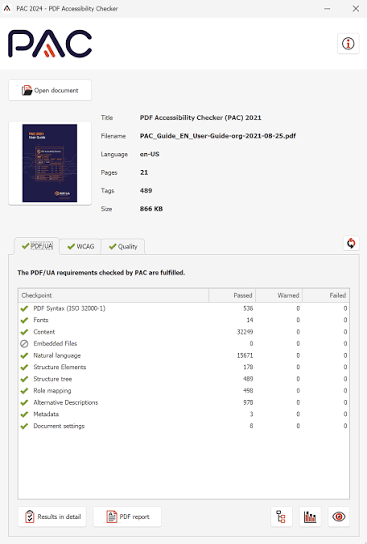
Every shop doing this work should have it anyway, because it is the checker auditors actually run. A report from PAC is worth more in an audit than any vendor's self‑assessment — which is exactly why we verify our own output against the same engine. The 2026 release adds AI‑assisted checks for some checkpoints that previously required human judgment. Treat them as triage help, not a replacement for review. The score itself is computed rather than asserted: checks passed divided by checks run, per standard.
The caveat: Windows‑only, one document at a time. It is a spot‑checker, not a pipeline component; axes4's API‑based validation is the batch path on the same engine.
10. Screen reader testing with NVDA, VoiceOver, and JAWS — the manual final check
Not a product, but it belongs on the list. Automated validators verify that tags are present; they cannot verify that the tags are good. "Image of chart" passes every checker ever written, and a real screen‑reader user still gets nothing from it. Reading order, alt‑text meaning, and form‑label usefulness are judgment calls only a human listening to the document can make.
The workflow is simple: open the remediated PDF, activate NVDA (free and open‑source on Windows) or VoiceOver (built into macOS), and navigate by keyboard. Listen for content that reads out of sequence, images announced without useful descriptions, and fields that announce the wrong label. Different screen readers interpret tag structures differently, so high‑stakes documents should be spot‑checked in more than one before sign‑off. JAWS, the dominant screen reader in enterprise and government, should also be used for final verification.
The caveat: it does not scale. Use it as the final check on samples and critical documents, not as the plan for a backlog.
How to choose the right PDF accessibility remediation software
Start with volume. Under roughly 50 documents a week, a desktop tool gives you full manual control at manageable cost.
Then check standards. A tool that covers PDF/UA but not your specific legal obligation may leave a gap. Verify the standards list on the vendor's own site, and if the standards themselves are the confusing part, our compliance standards guide covers ADA, WCAG, Section 508, and PDF/UA side by side.
Then decide where your documents are allowed to go. Cloud platforms, ours included, give you immediate scale with no infrastructure to run, but your documents leave your network. On‑premises deployments — desktop editors like Acrobat and CommonLook, or an SDK like PDFix — keep data inside your environment, and you carry the infrastructure and the job of scaling compute when batch volumes spike. If you have hard data‑residency requirements, ask any cloud vendor direct questions about data handling, retention, and processing location before you commit, and keep genuinely restricted document classes on‑premises. A hybrid pattern works well in practice: an on‑premises checker like PAC for sensitive material, a cloud pipeline for the public‑facing volume. Compliance dates under the ADA Title II web rule are April 26, 2027 for state and local entities serving populations of 50,000 or more, and April 26, 2028 for smaller entities and special district governments, after a one‑year extension by the Department of Justice in April 2026.
Pro tip: Before you finalize a tool, run the same test document through two validators — PAC and veraPDF. They interpret some PDF/UA rules differently, so a document that passes one can flag issues in the other. The tool whose output passes both is the safer production choice.
Comparison: top PDF accessibility remediation tools at a glance
FAQ
What is the best free PDF accessibility checker?
PAC 2026, maintained under the PDF/UA Foundation and hosted by axes4. It checks all machine‑verifiable PDF/UA and WCAG Level A and AA criteria, produces a structured pass/fail report, and includes a screen reader preview — free, no registration, Windows‑only, validation only. For a second opinion, veraPDF is the open‑source validator worth running alongside it, since the two engines interpret some rules differently.
How long does PDF accessibility remediation take per document?
Manual remediation ranges from under an hour for a simple layout to several hours for forms, complex tables, or scanned content. The steadier way to budget is per page: specialist firms typically run $5–$25+ per page, and complex fillable forms can reach $100+, which is why backlog economics favor automation.
Does passing an automated checker mean a PDF is accessible?
Passing is necessary but not sufficient. Checkers like PAC and veraPDF catch every structural error a machine can detect. They cannot judge whether alt text communicates the image's meaning, whether reading order makes sense to a listener, or whether a form label helps in context. Treat the checker score as the floor, and use screen reader testing as the final step for documents that need to hold up in an audit.
Should I target WCAG 2.1 AA or PDF/UA?
Both. WCAG 2.1 AA is the standard cited in the updated ADA Title II rule for state and local government. PDF/UA (ISO 14289) is the technical specification for how a PDF's internal structure must be built. A document can satisfy WCAG requirements while still failing PDF/UA structural checks, so the standards are complementary, not interchangeable.
Can remediation software handle scanned PDFs?
Yes, with OCR first. A scanned page is an image; a screen reader gets nothing without a text layer. After OCR, the document still needs full tagging, reading‑order correction, and alt text for figures. Scanned content consistently takes more effort than digitally born PDFs, and automated accuracy on it is lower — budget accordingly.
How does Accessibility On Demand™ verify its compliance scores?
Every document we process is scored through the Axes4 PAC Checker API, the industry validator auditors recognize, and we are benchmarking 97%+ average compliance scores across production volume. We treat that score as the floor, not proof: it confirms what automated validation can confirm. The Review Modal — reading‑order visualization, tag tree, alt‑text editing — is where human judgment verifies the document actually reads correctly before it ships.
Does Accessibility On Demand guarantee compliance?
No vendor can honestly guarantee 100% compliance, and a score is a floor, not proof of a perfect document. What we publish instead is a checkable mechanic: Level 2 targets a 95%+ WCAG 2.1 AA Compliance Score verified through the PAC (Axes4) checker, and if a document doesn't clear 95%, you're not charged for it.
Conclusion
If your backlog is a few dozen documents, pick a desktop tool from this list and build screen reader testing into your process. If it is thousands to millions of pages, the math only works with automation, and the vendor conversation should start with published pricing and a named verification method.
That is the standard we hold ourselves to: $0.30 to $12 per page, published, with every score verified through the Axes4 PAC Checker API. Your first 100 pages are free through the free trial, so you can judge the output on your own documents before spending anything.
Questions we did not answer here: [email protected].
Beat the Deadlines: Talk with a PDF Accessibility Specialist
The bar for IT accessibility in the public sector is rising. If your organization is navigating ADA compliance, WCAG requirements, or Section 508 accessibility and struggling to understand what applies to your PDF documents. Discover how AoD can ensure your organization stays ahead of accessibility deadlines, clarify scope, risk, and next steps.
Convenient External Links to learn more:
Visit our Homepageandwatch the AoD Demo (2min 33sec)
Enjoy AoD's Blog:Accessibility Insights
To Sign-up for a free trial of AoD orneed help navigating ADA Title II regulations, visit:Book a Demo
External Links to Additional Resources:
W3C:Web Content Accessibility Guidelines (WCAG) 2.1
Section 508 Standards:https://www.section508.gov/
ADA:Exceptions
First Steps Toward Compliance:https://www.ada.gov/resources/web-rule-first-steps/
DOJ Title II Web Accessibility Final Rule:https://www.ada.gov/resources/2024-03-08-web-rule/