Complex PDF Table Remediation: What Merged Cells, Multi-Level Headers, and Irregular Structures Cost You
By Accessibility on Demand | A Netra Labs Publication | Technical Implementation Series | Article 7
Simple tables are a solved problem. A single header row, a single header column, and an orderly set of data cells present no real challenge to modern remediation tools. The tables worth discussing are the ones that break those tools: tables built with merged cells, multi-level headers, row spans, and irregular structures that carry genuine data relationships. These are the tables most likely to expose the limits of conventional remediation, frustrate screen reader users, and surface first in accessibility audit findings.
For organizations managing large volumes of government, financial, educational, or compliance related documents, accessible PDF table remediation is never simply a matter of adding tags. It requires faithfully reconstructing the relationships that make a table meaningful, so that a screen reader user receives precisely what a sighted user perceives at a glance.
What WCAG 1.3.1 Requires for Data Tables
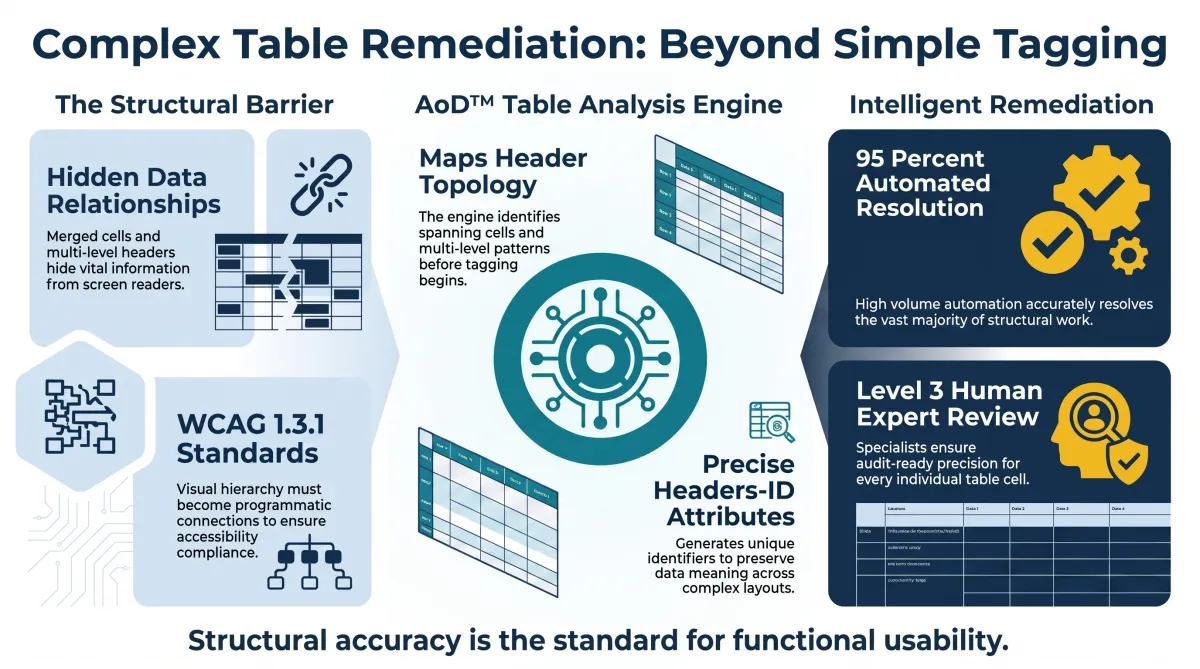
WCAG 2.2 Success Criterion 1.3.1, Info and Relationships, requires that information and relationships conveyed through visual presentation be programmatically determinable. For a data table, that means a screen reader user must be able to access the same relationships between headers and data that a sighted user perceives visually. In practice, every data cell needs an identifiable, programmatic association to its column header, its row header, or both.
For a simple table with one header row and one header column, that association is straightforward. Complexity arrives the moment a table introduces multiple header levels, merged cells, row spans, or irregular structures, patterns that appear most often in government data tables, financial reports, and statistical documents, and which fail remediation most often as well.
PDF/UA and Table Structure
Under PDF/UA, table cells are tagged as either TH for header cells or TD for data cells. Header cells can carry a Scope attribute (Row, Column, or Both) that establishes their relationship to nearby data. This approach serves simple tables well.
For more sophisticated structures, the Headers-ID mechanism is required. Each header cell receives a unique identifier, and each data cell references, by ID, every header that provides its full context. When a data cell sits beneath multiple levels of column headers and also belongs to a row header, a simple Scope relationship cannot express the complete structure. Only Headers-ID conveys the full set of relationships with precision.
Where Conventional Remediation Breaks Down
Merged Header Cells
A header spanning three or more columns is common in financial statements, comparison tables, and government reports. The relationship is unmistakable to the eye. Programmatically, it is another matter entirely. Standard automated tagging typically applies Scope=Column to each individual header cell beneath the span, so a header that visually covers three columns ends up pointing only to itself. The data cells beneath it inherit no association to the header above, and a relationship a sighted reader takes for granted disappears from the tag tree.
Multi-Level Column Headers
Consider a table with a primary header such as Program Expenditures, followed by secondary headers for individual years. Every data cell beneath that structure needs access to both levels. Remediation that associates a data cell only with the nearest header row misses the primary level entirely, and the screen reader user hears an isolated figure with no sense of the broader category it belongs to. The table can look entirely coherent on screen while remaining structurally incomplete underneath.
Row-Spanning Headers
A row header that spans several rows, common in budget and schedule tables used to group related line items, carries a relationship to every row within that span. Standard tagging applies Scope=Row to the first row only, leaving the remaining rows without any row header association at all. The context tying those rows together is lost the moment the reader moves past the first line.
Irregular Table Structures
Some tables never conform to a clean grid. Blank spacer cells, mixed data and total rows, columns that shift width from one section to the next, and groupings communicated purely through shading all present genuine layout analysis challenges. Automated tools can mistake a spacer cell for a data cell, mistake a total row for a header row, or miss a column grouping altogether. The result is a document that may pass a superficial structural check while still failing, in practice, to communicate what the table actually says.
How Accessibility On Demand™ Approaches Complex Tables
Accessibility On Demand™ treats complex table remediation as a structural analysis problem, not a tagging exercise. The AoD platform runs a dedicated table analysis engine alongside its broader document structure detection. Before any tagging occurs, the engine maps each table's full header topology, identifying spanning cells, multi-level header rows, row-spanning structures, and mixed data-and-total row patterns.
From that map, the platform determines whether Scope is sufficient for the table's complexity or whether Headers-ID is required. For tables that call for it, AoD generates unique identifiers for every header cell and constructs the explicit Headers attribute lists each data cell needs. The resulting tag structure communicates the full data relationship with the same clarity a sighted reader enjoys.
When Human Expertise Adds Value
Not every complex table resolves cleanly through automation. Tables with deeply nested structures, extensive merged regions, or header topology that cannot be determined from the visual layout with sufficient confidence are routed into AoD's Level 3 Human Expert Review workflow. Within the Review Module, a specialist evaluates the proposed TH and TD structure against the visual table, examines each data cell's Headers attribute list, and adjusts and approves the final structure before it ships.
This is automation exercised with discipline: resolve what can be resolved reliably by machine and bring expert judgment to bear precisely where complexity warrants it.
Why This Matters: The Cost of Getting It Wrong
Picture a state agency publishing an annual budget with merged headers and multiple levels of column headings. A sighted reader scans the table and understands instantly how each figure relates to the categories around it. A screen reader user, navigating cell by cell, depends entirely on the programmatic relationships beneath the surface. Without them, that user hears a number with no header, no category, and no meaning.
This is not a minor usability inconvenience. It is a complete information barrier, one that recurs across financial reports, government publications, constituent communications, compliance filings, and academic research wherever tabular data drives understanding. When these barriers appear in public-facing or compliance-critical documents, they become exactly the kind of specific, documentable failure that surfaces in complaint filings and regulatory review.
Verifying Complex Table Accessibility
Automated compliance checking confirms that cells are tagged and that header associations exist. It cannot confirm that those associations are semantically correct, which is precisely the distinction that matters. The most reliable verification is to test the remediated PDF directly with a screen reader.
Using NVDA or JAWS, navigate to the table and move through it cell by cell. The screen reader should announce each value together with its row and column headers. For a multi-level table, it should announce both the primary and secondary headers. For a row-spanning header, that same header should be announced on every row within its span.
If the announcement is complete, the table is accessible. If a value is announced without its header context, the association is missing or incorrect, and the tag tree's Headers attributes will show exactly where. This process takes roughly two minutes per table, a modest investment that catches failures automated checkers miss entirely, well before a screen reader user ever encounters them.
The Bottom Line: Accessible Tables Require More Than Tags
Complex tables reveal a truth that simple tables can obscure structural accuracy matters as much as technical tagging. A table can carry every TH and TD tag, look correct on screen, and pass a basic automated check, and still fail to communicate the relationships a screen reader user actually needs.
Genuine accessible PDF table remediation means understanding a table's underlying hierarchy, preserving relationships across merged and multi-level headers, applying explicit associations wherever complexity demands them, and confirming the result with assistive technology rather than assuming it. For organizations managing accessibility at scale, the most refined approach is never automation for its own sake. It is intelligent automation, the kind that recognizes document structure, applies the right technical methodology, and brings expert review into the process exactly where it adds real value. That is the standard Accessibility On Demand™ is built to deliver: a more considered path from complex, inaccessible tables to structured, audit-ready PDFs that serve every reader with equal fidelity.
Frequently Asked Questions
What is accessible PDF table remediation? Accessible PDF table remediation is the process of restructuring a PDF table so that its headers, data cells, and relationships are programmatically determinable and fully usable with assistive technology.
Why are merged cells difficult to remediate? Merged cells often represent relationships across multiple columns or rows that read clearly on screen but resist simple table tagging. Complex structures typically require explicit Headers-ID relationships to preserve that meaning.
When should Headers-ID be used instead of Scope? Scope suits simple table structures well. Headers-ID provides the explicit relationships needed for more complex tables involving multiple header levels, spanning headers, or overlapping header associations.
Can automated PDF remediation handle complex tables? Automation resolves many complex table structures reliably. Tables with deeply nested layouts, extensive merged regions, or genuinely ambiguous structure benefit from expert human review.
How should an accessible PDF table be tested? The most dependable method is navigating the remediated table with a screen reader such as NVDA or JAWS, confirming that every value is announced with its full, correct header context.
In Summary
A document's accessibility is measured not by whether it satisfies a checklist, but by whether every reader, regardless of the technology they rely upon, can draw the same meaning from it. Complex tables are where that promise is tested most rigorously, because the very features that make them useful to a sighted eye, merged headers, layered categories, grouped rows, are the features most easily lost on the way to a screen reader. Accessibility On Demand™ was built for exactly this level of rigor: precise structural analysis on every table, expert review where automation reaches its limit, and an unwavering commitment to tables that speak with complete clarity to every reader who encounters them.
About Accessibility on Demand™
Automation-first by design, not by compromise. Delivering compliance, speed, and cost-savings in one solution.
Accessibility on Demand™ (AoD) is an enterprise-grade, AI-powered PDF remediation platform designed for automation-first accessibility workflows, helping organizations make inaccessible PDFs compliant, audit-ready assets at scale without operational friction.
For organizations where accessibility is a strategic priority, AoD brings precision, speed, and control to a process that is too often fragmented and costly. It converts PDFs into WCAG 2.1 Level AA, PDF/UA, ADA, and Section 508-aligned documents in minutes, with up to 95% automation, delivering both measurable cost reduction and defensible compliance evidence.
Built for CIOs, IT leaders, and accessibility teams, AoD replaces labor-intensive remediation with intelligent automation across OCR, document structure tagging, reading order, meaningful alternative text, complex tables, formulas, and fillable forms. The result is a refined, scalable compliance operation that supports consistency, efficiency, and long-term governance.
AoD deploys as a self-service portal or integrates directly into enterprise document management and intelligent document processing pipelines via API, embedding accessibility upstream and preserving continuity across existing workflows.
AoD serves organizations across SLED, healthcare, federal government, higher education, financial services, insurance, and legal sectors, where document complexity is high, compliance expectations are rising, and the cost of inaccessibility is meaningful.
For organizations navigating ADA Title II, ADA Title III, Section 504, Section 508, AODA, and evolving accessibility requirements, AoD offers a partner-neutral path to compliance defined by precision, scalability, and measurable business impact.
Enterprise capabilities
API integration for upstream remediation within existing workflows and IDP stacks.
High-volume batch processing for large files and repositories.
Third-party validation with WCAG and PDF/UA compliance scoring.
Section 508- and ADA-aligned outputs with audit-ready reporting.
Dedicated account management and enterprise support.
Comprehensive onboarding and platform training.
For remediation professionals
For remediation professionals, AoD is built for the scale of what comes next. It handles the majority of the heavy lifting, including automated tagging, reading order, contextual alt-text metadata, and document structure, then delivers a complete tag tree so specialists can focus on the judgment, nuance, refinement, and governance decisions. At the center of accessibility is one essential truth: documents must be genuinely usable for the people who depend on them. Together, we can take on the trillions of pages ahead and raise the standard for what accessibility can be.
Beat the Deadlines: Talk with a PDF Accessibility Specialist
The bar for IT accessibility in the public sector is rising. If your organization is navigating ADA compliance, WCAG requirements, or Section 508 accessibility and struggling to understand what applies to your PDF documents. Discover how AoD can ensure your organization stays ahead of accessibility deadlines, clarify scope, risk, and next steps.
Convenient External Links to learn more:
Visit our Homepage and watch the AoD Demo (2min 33sec)
Enjoy AoD's Blog: Accessibility Insights
To Sign-up for a free trial of AoD or need help navigating ADA Title II regulations, visit: Book a Demo
External Links to Additional Resources:
W3C: Web Content Accessibility Guidelines (WCAG) 2.1
Section 508 Standards: https://www.section508.gov/
ADA: Exceptions
First Steps Toward Compliance: https://www.ada.gov/resources/web-rule-first-steps/
DOJ Title II Web Accessibility Final Rule: https://www.ada.gov/resources/2024-03-08-web-rule/
